
Custom Client Portal for Service Businesses: What to Build Before You Buy Software
A practical guide for service businesses deciding whether they need a custom client portal, an off-the-shelf portal, or a simpler client workflow first.
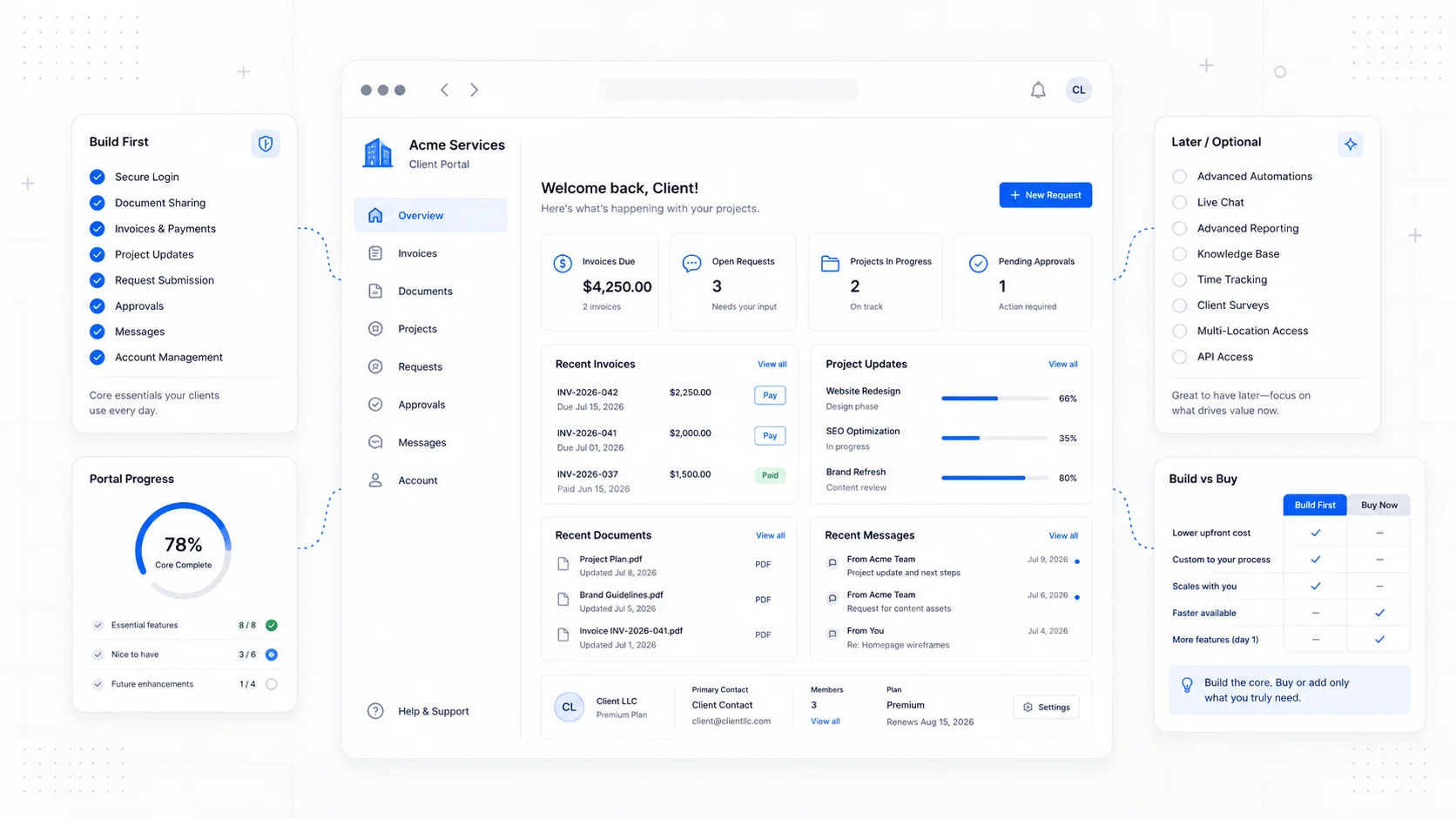
A client portal sounds like a big software project. Sometimes it is. More often, it is a simple idea that gets complicated because the business has not decided what clients actually need to do.
For a service business, a good client portal is not a dashboard for the sake of having a dashboard. It is a private place where clients can complete the actions that usually create delays:
- Submit a request.
- Approve a quote.
- View project or job status.
- Upload files.
- Review invoices.
- Make a payment.
- See appointment details.
- Find past documents.
- Send a structured message.
That is why client portals show up so often in software for service teams. Jobber's client hub, for example, focuses on requests, quote approvals, scheduled jobs, and payments. Home-service platforms like BlueSuite describe portals around requests, quotes, invoices, and appointments. Those patterns are useful because they reveal what clients actually want: fewer calls, fewer lost emails, and one place to act.
The question is not "Should we have a portal?" The better question is "Which client actions are expensive when they happen through email, phone calls, or spreadsheets?"
Start With the Bottleneck
Do not start by listing features. Start by listing delays.
Common delays in service businesses include:
- Leads submit vague requests and need three follow-up emails.
- Clients approve quotes verbally, then dispute details later.
- Invoices get buried in email.
- Clients ask for status updates your team already knows.
- Files arrive through random channels and get lost.
- Appointment changes require back-and-forth scheduling.
- Repeat customers have no easy way to request new work.
- Staff manually copy form data into a CRM, calendar, or invoice tool.
Each delay has a cost. It may cost staff time, cash flow, customer trust, or sales momentum.
A good portal removes one or two of those delays first. A bad portal tries to replace the entire business process in one launch.
When an Off-the-Shelf Portal Is Enough
You probably do not need custom software if your workflow matches a standard category.
Off-the-shelf client portal software can work well when:
- You sell similar services repeatedly.
- Your quote, invoice, and payment process is standard.
- You do not need unusual permissions or workflows.
- Your team can adapt to the tool's process.
- Your main goal is speed, not differentiation.
- You are comfortable paying monthly for the platform.
For example, a contractor that needs job requests, estimates, scheduling, invoices, and payments may be better served by a vertical platform built for contractors. A consultant who needs file sharing, onboarding forms, and simple task visibility may be fine with a general client portal tool.
Buying software is usually faster than building software. The tradeoff is that your process must fit inside the product.
When a Custom Client Portal Makes Sense
Custom portals become useful when the client experience is part of how you compete.
Consider custom software when:
- Your quoting process has business-specific rules.
- Clients need different views based on account type, role, location, or project.
- You already have data in Supabase, Airtable, HubSpot, Stripe, QuickBooks, or another system and need a clean front end.
- Staff are duplicating work between disconnected tools.
- Clients need to see live status, not manually updated notes.
- You need a branded experience that feels like your business, not a third-party product.
- The monthly cost of multiple tools is already high.
- Your workflow is too specific for generic portal software.
The custom route is not automatically better. It is better when the portal supports a process that is specific, valuable, and repeated often.
The Minimum Useful Portal
A first portal should be boring in the right way. It should solve a measurable operational problem.
For many service businesses, version one can be:
- Secure login.
- Client profile.
- Request form.
- Project or job list.
- Status page.
- Documents or file uploads.
- Invoice/payment links.
- Notification emails.
- Admin view for staff.
That is enough to centralize the client relationship without overbuilding.
Avoid starting with:
- A complex chat system.
- Fully custom reporting.
- Mobile apps.
- Too many roles.
- Deep integrations before the workflow is proven.
- A dashboard full of charts nobody uses.
The first version should make one workflow calmer. Once clients and staff use it, the next features become obvious.
Portal Features Worth Prioritizing
Structured Requests
The request form is often the highest-leverage feature.
Instead of asking clients to "tell us what you need," collect the details your team always asks for later:
- Service type.
- Location.
- Timeline.
- Budget range.
- Urgency.
- Photos or documents.
- Preferred contact method.
- Existing customer or new customer.
This improves lead quality and reduces admin time.
Quote and Proposal Approval
If approvals happen through email, details get scattered. A portal can give each quote one clear source of truth.
Useful approval features include:
- Quote summary.
- Scope details.
- Optional upgrades.
- Expiration date.
- Approval button.
- Change request option.
- Timestamped acceptance.
This is especially useful for service businesses where scope clarity protects margins.
Status Updates
Clients often ask for updates because they cannot see progress.
A portal does not need a complex project management system to solve this. Even simple statuses help:
- Received.
- In review.
- Quote sent.
- Approved.
- Scheduled.
- In progress.
- Waiting on client.
- Complete.
The goal is not to show every internal task. The goal is to answer the client's natural question: "Where does this stand?"
Documents and Files
File chaos is a silent productivity drain.
A portal can organize:
- Contracts.
- Invoices.
- Receipts.
- Reports.
- Design files.
- Photos.
- Permits.
- Project notes.
- Shared assets.
If the same document gets requested more than once, it probably belongs in the portal.
Payments
Payments should be easy to find and easy to complete.
You may not need to build payments directly into the portal at first. A secure Stripe or invoice payment link may be enough. The portal can simply show invoice status and route the client to the correct payment page.
That is often safer and faster than custom payment logic.
What to Connect Behind the Scenes
The real value of a custom portal is often in the integrations.
Useful connections include:
- CRM for contacts and leads.
- Calendar for appointments.
- Stripe for payment links and invoices.
- Email for notifications.
- Supabase or Postgres for portal data.
- File storage for uploads.
- Internal admin tools for staff.
- Analytics for measuring usage and bottlenecks.
The portal should not create another disconnected database unless there is a reason. It should become a clean client-facing layer over the systems your team already uses.
How to Decide: Build, Buy, or Wait
Use this quick decision framework.
Buy a portal if:
- Your workflow is common.
- You need something this week.
- You can adapt to the product.
- The monthly cost is reasonable.
Build a custom portal if:
- Your workflow is specific.
- You need integrations that generic tools do not handle well.
- The client experience affects sales or retention.
- You want software that fits your process instead of changing your process.
Wait if:
- You do not know what clients need yet.
- Your internal process is messy.
- The portal would just digitize confusion.
- A better form, email sequence, or invoice workflow would solve the immediate issue.
Waiting is not failure. Sometimes the right first move is to improve the intake form and automate follow-up before building a login area.
The Best First Step
Before building anything, map one client journey:
- How does the client request help?
- What does your team need to know?
- Where does the request go?
- Who responds?
- What does the client need to approve?
- How do they pay?
- What do they ask about later?
- What could they self-serve?
That map will tell you whether a portal is worth building and what version one should include.
Final Takeaway
A custom client portal is worth it when it makes the business easier to run and easier to buy from. It should reduce scattered communication, speed up decisions, and give clients confidence that work is moving.
Do not build a portal because competitors have one. Build it because you know exactly which repeated client actions should become simpler.
Sites That Grow designs and builds client portals, internal tools, and service-business web apps around the workflow first. The software comes after the process is clear.
More posts from the blog.

From Contact Form to CRM: The Minimum Lead Pipeline Every Service Business Should Automate
A practical lead pipeline for service businesses: connect forms, calls, email, CRM records, reminders, follow-ups, and reporting so good leads stop disappearing.

The 2026 Website Content Refresh Playbook: Updating Old Pages Without Breaking SEO
A practical content refresh process for small business websites: how to update stale pages, preserve rankings, improve AI search visibility, and avoid SEO mistakes.

The AI Chat Widget Decision: When It Helps Leads and When It Hurts Trust
AI chat widgets can qualify leads and answer common questions, but they can also slow the site, invent answers, mishandle privacy, and damage trust. Here is how to decide.
Keep reading?
More field notes from building modern websites and software for real businesses.