
Disaster Recovery for Your Website: Backups, Runbooks, and the Day Things Break
A practical disaster recovery guide for small business websites — the 3-2-1 backup rule, RTO/RPO, runbooks for common incidents, and communicating outages.
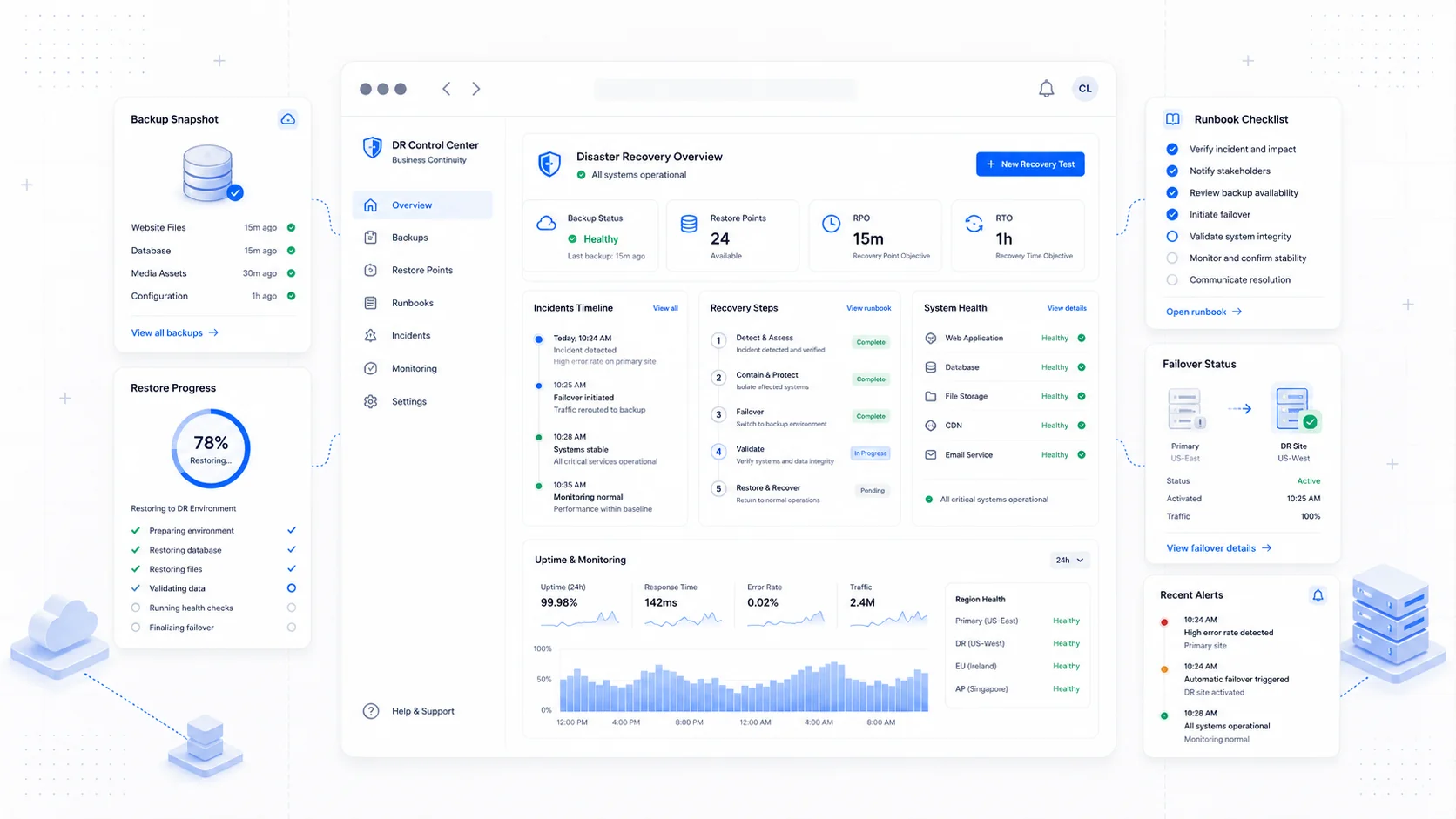
The day a website breaks, you find out quickly which decisions you made months earlier were the right ones. The owner who set up off-host backups, wrote a one-page runbook, and tested a restore once a quarter is mildly inconvenienced. The owner who assumed the hosting provider had it covered is on the phone with support at 11 PM trying to remember the registrar password while customers email asking why the contact form returns a 500.
Disaster recovery is one of those topics that sounds enterprise and is actually small. The fundamentals are old, well-understood, and apply just as cleanly to a five-page service business site as to a Fortune 500 application. They are also one of the cheapest forms of insurance you can buy — usually a few hours of setup and a small monthly cost, in exchange for the ability to be back online in an hour instead of a week.
This is the disaster recovery playbook we run for website care plan clients, scaled appropriately for a service business.
The Two Numbers That Matter: RTO and RPO
Before any tool decisions, define two numbers for the business. Without them, every backup conversation is unfocused.
- Recovery Time Objective (RTO) — how long the site can be down before the business is genuinely hurt. Measured in minutes or hours.
- Recovery Point Objective (RPO) — how much data you can afford to lose, measured in time. An RPO of 24 hours means you can tolerate losing up to a day of changes.
For a typical service business marketing site, an RTO of 4 hours and an RPO of 24 hours is reasonable. For a site with a booking system or an active customer portal, both numbers tighten. For an ecommerce site or a SaaS product, RTO might be measured in minutes.
Once you have the numbers, every other decision follows. A 4-hour RTO and 24-hour RPO is achievable with daily backups and a documented restore process. A 1-hour RTO and 1-hour RPO requires hot standby infrastructure, continuous replication, and substantially more cost.
NIST Special Publication 800-34 on contingency planning is the canonical reference for the framework. The practical implementation for a small business is a fraction of what NIST describes, but the vocabulary is useful.
The 3-2-1 Backup Rule
The 3-2-1 rule predates the cloud and still holds up:
- Three copies of your data.
- On two different media or storage systems.
- With one copy stored off-site (or off-account).
The CISA reference on data backup options lays out the reasoning. The point is to survive any single failure mode: a corrupted database, a deleted production environment, a compromised hosting account, a ransomware event that encrypts everything connected to the same credentials.
For a typical small business website, that maps to:
- Copy one: the live production database and file storage.
- Copy two: a daily snapshot held by your hosting provider in their backup system.
- Copy three: an off-host backup in a separate cloud account, usually S3, Cloudflare R2, Backblaze B2, or similar.
The off-host backup is the one most owners skip and the one that matters most. A backup on the same hosting account is gone the same day the account is compromised or the provider goes down.
What to Back Up
Three categories of data on a typical small business website need backing up. They are often in different places.
Database. All structured content, user accounts, form submissions, settings. For most sites this is a Postgres or MySQL database. Hosting providers typically offer automated daily snapshots; treat that as a starting point, not the final answer.
File storage. Images, PDFs, videos, any user-uploaded content. On a modern stack this is usually S3, R2, or equivalent object storage. Object storage is durable but is not a backup against accidental deletion or compromise — enable versioning and consider cross-region replication.
Configuration and code. Environment variables, deployment configurations, and the application code itself. Code lives in Git, which is its own version of a backup; environment variables and secrets need an explicit backup strategy because they typically do not live in Git.
For sites built on a CMS, also consider the CMS-level export. WordPress, for example, can export content to XML, which is a useful additional safety net even if you have full database backups.
Backup Frequency and Retention
Backup frequency should match the RPO. If you can tolerate losing 24 hours of data, daily backups are fine. If you cannot, you need shorter intervals.
A workable retention policy for a typical small business site:
- Daily backups retained for 30 days.
- Weekly backups retained for 90 days.
- Monthly backups retained for 12 months.
- One annual snapshot retained indefinitely if regulatory or contractual requirements apply.
This is the grandfather-father-son retention pattern, updated for cloud storage where the cost of keeping older snapshots is small.
Encrypt backups at rest with keys you control, store them in a separate cloud account from production, and audit retention monthly to confirm the schedule actually ran.
The Restore Test: The One Step Everyone Skips
A backup you have never restored is a hope, not a plan. The single most common failure mode is discovering during a real incident that the backup is corrupted, incomplete, or the restore process does not work as documented.
Schedule a quarterly restore test. Pick a backup, restore it to a staging environment, and confirm:
- The database loads cleanly with no errors.
- The application starts up and serves pages.
- Recent content is present.
- File assets render correctly.
- Authentication works for at least one test account.
The first test will reveal something broken. That is the entire reason to do it. The second one will be smoother. By the third, the process is mechanical.
If you can automate the restore test (for example, with a scripted teardown and rebuild of the staging environment), you should. Manual restore tests are fine for small sites; automation pays off as the system grows.
Runbooks: Calm Decisions Made in Advance
A runbook is a written procedure for handling a specific incident type. The point is to make decisions when you are calm and execute them when you are not.
Every small business site should have, at minimum, four runbooks:
Runbook 1: Site is down
What to check, in order, when the site stops responding:
- Is the hosting provider experiencing an outage? Check the provider's status page.
- Is DNS resolving correctly? Check with
digor DNS Checker. - Is the SSL certificate valid? Check with SSL Labs.
- Is the latest deploy the cause? Check deploy timestamps against the outage start.
- If the cause is unknown after 15 minutes, roll back to the last known-good deploy.
- If the rollback does not resolve, escalate to the hosting provider with diagnostic info.
- Communicate. Update the status page or social channel.
Each step should be a single action with clear inputs and outputs.
Runbook 2: Site is compromised
For when there is evidence of a breach: defaced pages, unexpected admin accounts, unauthorized changes.
- Take the site offline immediately by enabling maintenance mode or pulling the DNS record.
- Rotate every credential associated with the site: hosting account, CMS admin, database, API keys, email senders.
- Restore from the most recent known-clean backup. "Known-clean" means before the suspected compromise — check logs to identify the timeframe.
- Patch the underlying vulnerability before bringing the site back online.
- Investigate scope. What data could the attacker have accessed? Notify affected users if required.
- Document the incident and timeline.
The CISA Ransomware Guide is the authoritative reference for ransomware-specific incidents and applies more broadly to compromise scenarios.
Runbook 3: Lost domain or registrar issue
The nightmare scenario. Domain hijacking, expired domain, DNS misconfiguration that takes the site offline.
- Confirm the domain's WHOIS status at the registrar.
- If the domain was transferred or hijacked, contact the registrar immediately and invoke their dispute process.
- If the domain is locked but DNS is wrong, restore DNS records from documentation. (You should have an export of your DNS zone in version control or backups. Most providers can export zone files.)
- Communicate via a fallback channel. Customers cannot reach the website by definition.
This is why MFA on the registrar is non-negotiable. We covered this in the website security basics post.
Runbook 4: Email or critical integration is down
Service businesses depend on more than the website. The contact form failing because the email sender is down is a website problem from the customer's perspective.
- Check the sender's status page (SendGrid, Postmark, Resend, etc.).
- Verify SPF, DKIM, and DMARC records are still valid at the DNS level.
- If the issue is provider-side, the runbook ends — wait, communicate, document.
- If the issue is at your end, use the secondary mail route if you have one. (Configuring a secondary sender or a fallback queue is worth doing for any site where the contact form is a primary lead source.)
Each of these runbooks should be one page. If it is longer, it is too detailed.
Status Pages and Communicating Outages
When something breaks, the second-worst thing is the outage itself. The worst thing is silence. Customers who can see "we know, we're working on it, here's what we know so far" forgive far more than customers who hear nothing.
A status page does not have to be sophisticated. It needs to:
- Live on a separate domain or subdomain hosted by a different provider, so it survives an outage of the main site.
- Show the current status of the website, the email system, and any customer-facing integration.
- Have a history of past incidents.
- Be updated by hand if necessary, with timestamps.
Tools like Better Stack, Instatus, and Statuspage handle this well. For a one-person operation, even a manually updated page on a separate host is fine.
The communication template that works for most incidents:
[Time]. We are aware of an issue affecting [system]. Customers may experience [impact]. We are investigating and will post an update by [time].
[Time]. We have identified the cause as [brief description]. Estimated time to resolution: [time]. We will post the next update by [time].
[Time]. The issue has been resolved. Service is fully restored. We will publish a more detailed post-incident summary within 48 hours.
The Atlassian Incident Communication Handbook is a free resource that covers the full discipline.
Post-Incident Reviews
After every meaningful incident, do a brief written review. A page or less is enough. The point is to learn something, not to assign blame.
A workable template:
- Summary. What broke, when, for how long, and how customers experienced it.
- Timeline. What happened, in chronological order, with timestamps.
- Root cause. The actual cause, not the proximate one.
- What worked. Decisions and tools that helped.
- What did not. Decisions, tools, or gaps that hurt.
- Action items. Specific changes with owners and dates.
Google's SRE book has a thorough chapter on postmortem culture that scales down well to small teams.
Disaster Recovery Plan: One Page
If you do nothing else, write a single page that captures:
- The RTO and RPO for the site.
- Where the live site lives (provider, account ID, region).
- Where the backups live (provider, account, retention).
- Who has admin access to each.
- The four runbook scenarios above, in summary.
- The status page URL and how to update it.
- Contact information for the people who would need to know in an incident.
Store the page somewhere not dependent on the website (a Google Doc, a Notion page, a paper printout in a drawer if you must). Update it when anything changes. Review it annually.
This document does for incidents what a will does for estates: it is uncomfortable to write, easy to defer, and the difference between a recoverable situation and a chaotic one when you actually need it.
What This Looks Like for a Typical Service Business
The stack for a small service business is not complicated:
- Hosting with daily automated backups (Vercel, Netlify, Cloudflare, a managed CMS host).
- Off-host backups to a separate cloud account, daily, retained 30 days minimum. A few dollars a month at most providers.
- Object storage versioning turned on for any uploaded content.
- Code in Git with deploy history.
- Environment variables backed up to a password manager or secrets store.
- DNS zone exported and stored in the same documentation as the runbooks.
- A status page ready to use, even if you rarely need it.
- The one-page DR document.
Total cost: usually under $20/month for a typical site. Total setup time: a day spread over a week. Total ongoing attention: a quarterly restore test and an annual review.
That is enough to handle every scenario short of a multi-provider catastrophe, which is not a realistic risk profile for a small business website.
When to Bring in Help
The work itself is not complicated. The reason most small businesses do not have a real disaster recovery setup is the same reason they do not have monthly maintenance: it does not happen, then it does not happen for six months, then something breaks. The discipline is the hard part.
This is the kind of work that fits cleanly inside our website care plans. It is also the kind of work we build into custom software projects from day one because the cost of fixing it later is always higher than the cost of getting it right at the start. If you would rather know that the boring infrastructure work is being done than have to worry about it yourself, start a conversation and we will pull a real assessment of where your current site stands.
Disaster recovery is the kind of investment you hope never pays off. The day it does is the day you remember why you made it. Most owners only learn that lesson once.
More posts from the blog.
From Contact Form to CRM: The Minimum Lead Pipeline Every Service Business Should Automate
A practical lead pipeline for service businesses: connect forms, calls, email, CRM records, reminders, follow-ups, and reporting so good leads stop disappearing.
The 2026 Website Content Refresh Playbook: Updating Old Pages Without Breaking SEO
A practical content refresh process for small business websites: how to update stale pages, preserve rankings, improve AI search visibility, and avoid SEO mistakes.
The AI Chat Widget Decision: When It Helps Leads and When It Hurts Trust
AI chat widgets can qualify leads and answer common questions, but they can also slow the site, invent answers, mishandle privacy, and damage trust. Here is how to decide.
Keep reading?
More field notes from building modern websites and software for real businesses.