
GDPR, CCPA, and Cookie Banners: What Actually Applies to a Small Business Site
What GDPR, CCPA, and cookie banner laws actually require of a small business website — jurisdiction, consent, dark patterns, and when you don't need a banner.
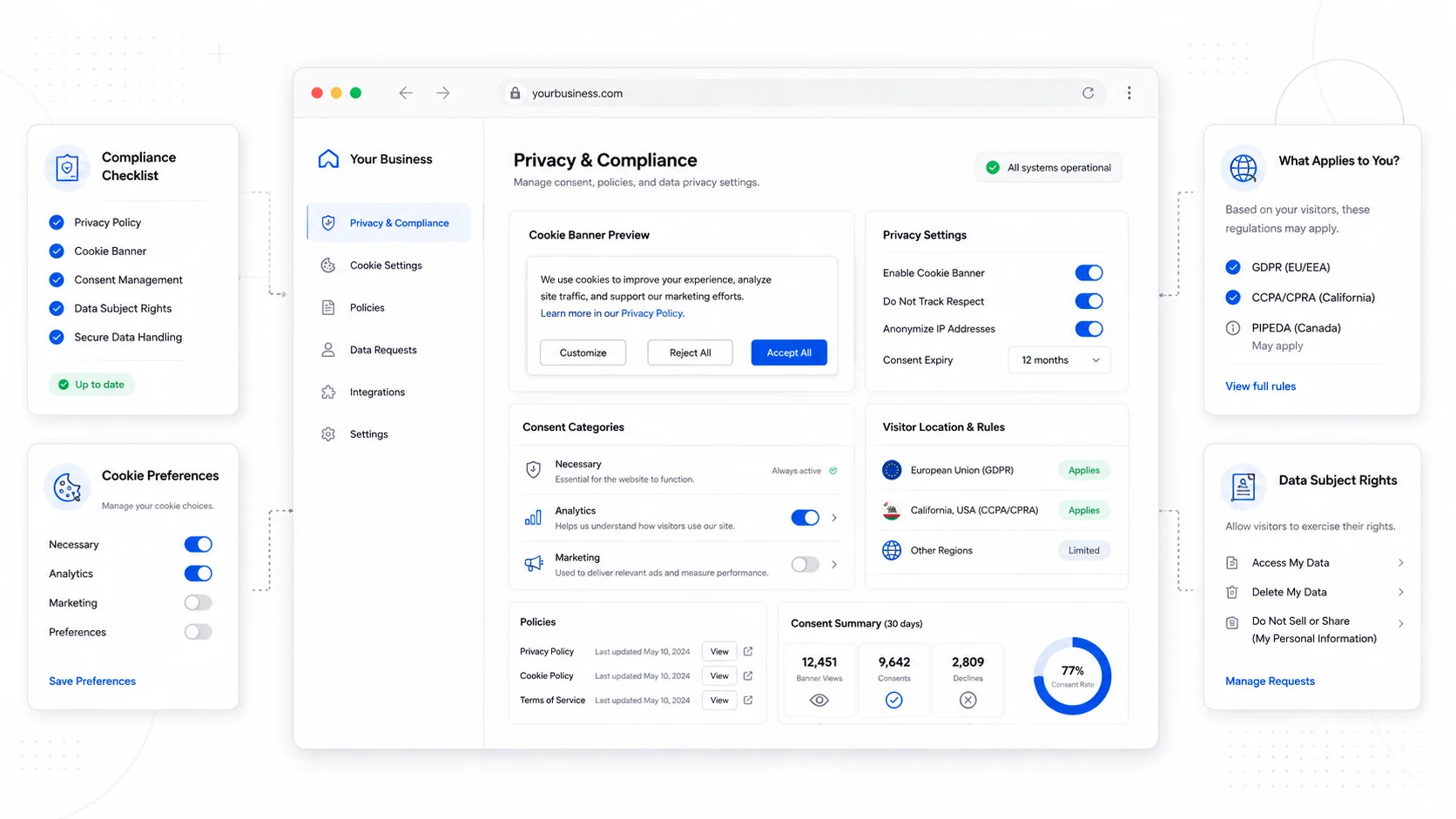
There is a particular kind of email small business owners get from their lawyer or their cousin who works in tech: "you need a cookie banner or you'll get sued." It is almost never wrong enough to be useful and almost never right enough to act on. The actual answer to whether you need a cookie banner, a privacy policy, a Data Processing Agreement, or a consent management platform depends on a half-dozen specific questions about who you serve, what you collect, and where they live.
This post is the version of that conversation we have with service business clients before they spend money on compliance theater. It is not legal advice — for a real opinion you should talk to a lawyer who knows your jurisdiction. It is the operational map that tells you what questions to ask, what genuinely applies to most small businesses, and what is overengineering.
The Three Regimes That Matter Most
Three regulatory regimes drive most of the privacy compliance noise that lands on small business owners:
- GDPR (Europe) — the EU's General Data Protection Regulation, in force since 2018, plus the related ePrivacy Directive that governs cookies specifically.
- CCPA / CPRA (California) — the California Consumer Privacy Act as amended by the California Privacy Rights Act.
- State-level US laws — Virginia (VCDPA), Colorado (CPA), Connecticut (CTDPA), Utah (UCPA), Texas, and a growing list of others. The IAPP US State Privacy Legislation Tracker is the canonical reference.
Other regimes exist (Brazil's LGPD, Canada's PIPEDA, the UK's UK GDPR, China's PIPL) but if you are a US-based service business with US customers, the practical question is whether you trigger GDPR (mostly by serving EU residents in any meaningful way) and whether you trigger CCPA or one of the other state laws (mostly by hitting revenue or data thresholds).
Does GDPR Apply to You?
GDPR applies to your business if you are processing personal data of people in the European Economic Area. The key word is "processing," which the regulation defines extremely broadly — collecting an email address through a contact form is processing.
The territorial scope, defined in Article 3 of the regulation, captures you if you:
- Have an establishment (office, employees) in the EU, regardless of where the processing happens.
- Offer goods or services to people in the EU, even from outside it.
- Monitor the behavior of people in the EU (analytics, tracking) when they are in the EU.
A US service business with US clients, no EU marketing, and no plans to take EU customers is generally outside GDPR's scope. A US service business that runs Facebook ads targeting Europeans, accepts EU clients without restriction, or uses analytics that capture EU visitor behavior is generally inside it.
If you are inside scope, the practical implications:
- A privacy notice that meets Article 13 disclosure requirements.
- A lawful basis for every processing activity (consent, contract, legitimate interest, etc.).
- Data subject rights — access, deletion, portability, objection — that you can actually fulfill.
- A cookie or tracking consent mechanism that meets the bar of "freely given, specific, informed, unambiguous, and as easy to withdraw as to give." The European Data Protection Board's guidelines on consent are the source of truth on what consent looks like in practice.
- A Data Processing Agreement with every vendor that processes personal data on your behalf (your hosting provider, your CRM, your email platform).
GDPR fines have shown up in serious numbers for big companies. For a small US service business outside scope, the practical risk is closer to zero. If you serve EU customers regularly, the risk is real and the right answer is to actually comply, not to bolt on a banner and hope.
Does CCPA / CPRA Apply to You?
The California regime applies to a "business" that does business in California and meets at least one of three thresholds:
- Annual gross revenue over $25 million.
- Buys, sells, or shares the personal information of 100,000 or more California consumers or households per year.
- Derives 50% or more of annual revenue from selling or sharing California consumers' personal information.
The actual statute and current thresholds are maintained at the California Attorney General's CCPA page. The California Privacy Protection Agency publishes the CPRA regulations governing implementation.
The vast majority of small service businesses do not hit any of those thresholds. If you do not, CCPA does not apply to you in the consumer rights sense — though you may still want a privacy policy on general grounds (other state laws, contract requirements, customer expectations).
If you do hit a threshold, the practical implications are similar in spirit to GDPR: a clear privacy notice, the ability to honor "do not sell or share" requests via the Global Privacy Control signal, and processes for access and deletion requests. Selling or sharing personal information for cross-context behavioral advertising is the trigger that often catches businesses off guard, because "sharing" includes setting third-party advertising cookies even without a direct money transfer.
Other US State Laws
The state-level patchwork keeps growing. Most of the active state privacy laws use thresholds in the same ballpark — typically processing personal data of 100,000+ residents annually, or generating significant revenue from selling personal data. Most also include an "applicability" test that excludes the smallest businesses.
A small service business with a few thousand local customers is generally outside the thresholds of every existing state privacy law. A small business with a national audience and aggressive ad targeting may not be. The IAPP tracker is the reference; the conservative move when in doubt is to honor data subject rights universally because it is operationally simpler than trying to scope by state.
What Counts as Personal Data
The "personal information" or "personal data" definition under both GDPR and CCPA is much broader than most people assume. It includes:
- Names, email addresses, phone numbers.
- IP addresses (almost always considered personal data under GDPR).
- Cookie IDs, advertising IDs, device fingerprints.
- Geolocation, even at city or postal code resolution.
- Behavioral data — pages viewed, time on site, clicks — when tied to any identifier.
It does not generally include truly anonymous data (aggregated counts where no individual can be re-identified) and it does not include data about businesses where no individual is identifiable.
The practical implication for a small business website: if you run any third-party analytics, advertising pixel, or marketing tool, you are processing personal data, full stop. The question is whether you are doing so lawfully.
Cookie Banners: When You Actually Need One
The cookie banner question is the one that gets the most heat and the most bad answers. Here is the unromantic version.
You need a consent banner under GDPR/ePrivacy if:
- You are inside GDPR's territorial scope (see above), AND
- Your site sets non-essential cookies or uses similar storage technologies (analytics, advertising, embedded content from third parties that drop cookies) before the user opts in.
You do not need a consent banner under those rules if your site only uses strictly necessary cookies (session management, language preferences, security tokens) and no analytics or advertising pixels.
Under CCPA, the framing is different. There is no opt-in requirement, but California residents must be able to opt out of "sale" or "sharing" of their personal information, and businesses subject to CCPA must honor the Global Privacy Control signal sent by the browser. A "Do Not Sell or Share My Personal Information" link in the footer is the standard implementation.
In practice, the question for most small businesses is not "do I legally need a banner" but "given the analytics and ad tools I run, what is the cleanest way to be honest with users." That answer is usually one of two:
- Strip the trackers. Use Plausible, Fathom, Cloudflare Web Analytics, or another cookieless analytics tool. No cookies, no consent banner needed, no compliance overhead.
- Add a real consent management platform. OneTrust, Cookiebot, Osano, Termly, or similar. They handle consent capture, vendor scanning, region-specific rules, and the Global Privacy Control signal.
For most small US service businesses, option one is the better answer. Cookieless analytics give you what you actually need (page views, sources, conversions) without the compliance surface area or the banner that hurts conversion.
Dark Patterns: What Not to Do
Both GDPR enforcement and the FTC have come down hard on "dark patterns" in consent flows. The well-documented anti-patterns:
- Pre-checked boxes for non-essential cookies.
- "Accept All" buttons that are visually prominent while "Reject All" requires multiple clicks or is hidden in a sub-menu.
- Cookie walls that block all content unless the user accepts.
- Confusing language designed to make rejection hard.
- "Legitimate interest" toggles set to on by default for purposes that genuinely require consent.
The European Data Protection Board's guidelines on deceptive design patterns and the FTC's enforcement actions are clear: consent has to be a real choice, presented honestly. The cleanest test is whether the "no" option is as easy to find and click as the "yes" option. If it is not, the consent is not valid.
What Most Small Service Businesses Should Actually Do
Stripping out the noise, here is the operational baseline for a typical small US service business:
- Publish a real privacy policy. Not a template scraped from a competitor. Disclose what you collect, how you use it, who you share it with, and how to contact you. Termly, iubenda, and similar tools generate competent baseline policies for low cost. A lawyer can review the result for a few hundred dollars.
- Default to cookieless analytics. Switch to Plausible, Fathom, or Cloudflare Web Analytics. Drop Google Analytics if you are not actively using its advanced features. This single change removes most of the compliance surface area for most small businesses.
- If you must use tracking analytics or ad pixels, add a consent management platform that handles GDPR consent for EU visitors and CCPA opt-out for California visitors. Configure it to default to "no tracking" until consent is given and to honor the Global Privacy Control.
- Honor data subject rights. Have a written process for handling deletion, access, and opt-out requests, even if you rarely receive them. A simple form on the site that emails an internal address is fine.
- Sign DPAs with vendors that hold customer data. Most major SaaS providers publish a standard DPA you can accept online. Keep records.
- Limit what you collect. Do not capture phone numbers in a contact form if you do not need them. Do not store form submissions indefinitely if you do not use them. Less data is less risk.
- Train the people who handle the data. A leak is rarely a hack; it is usually an employee CCing the wrong person on a spreadsheet.
That is the actual program. It is not glamorous and it does not require a six-figure compliance suite.
When You Actually Don't Need a Cookie Banner
For clarity, the conditions under which you can skip a cookie banner entirely:
- You are not inside GDPR's territorial scope, AND
- You are not subject to CCPA / state privacy laws (under the thresholds), AND
- Your site uses only strictly necessary cookies — no analytics, no ad pixels, no embedded third-party content that drops cookies, OR all such tools you do use are demonstrably cookieless.
A surprising number of small service businesses can meet this test if they are willing to pick cookieless analytics. We make that the default on most new builds for that reason — it is the cleanest path through the compliance landscape and it removes a banner that has documented negative effects on user behavior. The same thinking informs the SEO-focused builds we run, where the privacy story is part of the build, not an afterthought.
What to Do This Quarter
If you are currently running a generic cookie banner on a site that probably does not need one, or running no banner on a site that probably does:
- Inventory every third-party tracker on your site. The PageXray extension or browser DevTools' Application tab will list cookies and storage. Decide which ones you actually use.
- Decide whether you are willing to switch analytics. Cookieless options are mature in 2026; the data is similar enough for almost every small business decision.
- Have a real privacy policy that reflects what your site actually does.
- If you keep tracking analytics or ad pixels, install a competent consent management platform and configure it honestly.
- Set up an internal mailbox and a one-page process for handling data subject requests when they come in.
Compliance is rarely as scary as the marketing emails make it sound and rarely as simple as the "free policy generator" makes it sound. The middle ground is a defensible privacy posture that fits a small business, and it is well within reach. If you want help mapping your current setup to that bar, we run privacy reviews as part of our website care plans, and the contact form is the right starting point.
The point of all of this is not to satisfy a regulator — it is to be the kind of business that customers can trust with their information. The legal posture follows from the operational one, not the other way around.
More posts from the blog.
From Contact Form to CRM: The Minimum Lead Pipeline Every Service Business Should Automate
A practical lead pipeline for service businesses: connect forms, calls, email, CRM records, reminders, follow-ups, and reporting so good leads stop disappearing.
The 2026 Website Content Refresh Playbook: Updating Old Pages Without Breaking SEO
A practical content refresh process for small business websites: how to update stale pages, preserve rankings, improve AI search visibility, and avoid SEO mistakes.
The AI Chat Widget Decision: When It Helps Leads and When It Hurts Trust
AI chat widgets can qualify leads and answer common questions, but they can also slow the site, invent answers, mishandle privacy, and damage trust. Here is how to decide.
Keep reading?
More field notes from building modern websites and software for real businesses.