
Schema Markup for Small Business Websites: A Practical Guide
A practical guide to schema markup for small business websites. Which schema types matter most, how to implement structured data, and how to test it.
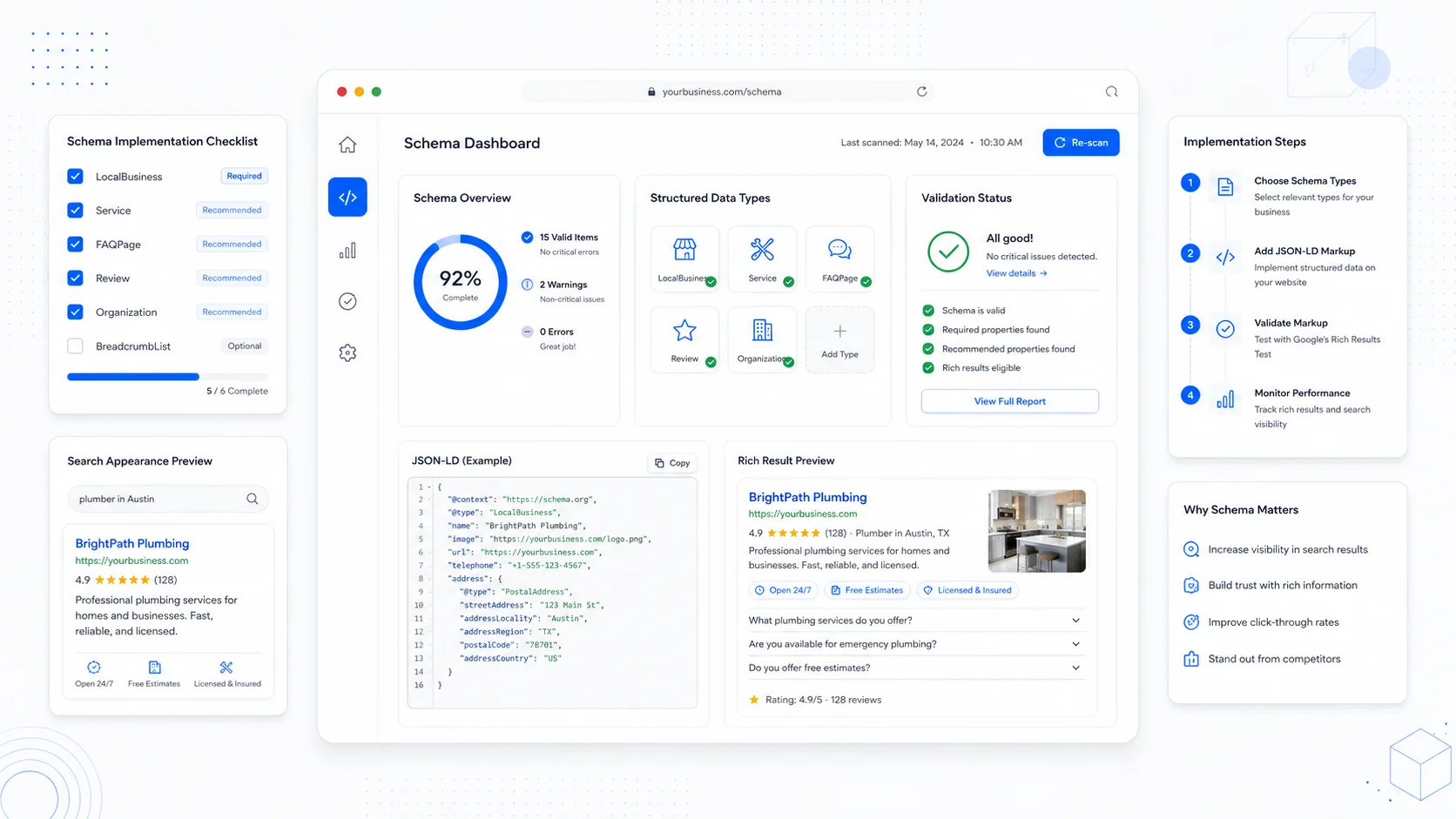
Schema markup is one of those SEO topics that sounds technical and ends up being mostly common sense. It is a way of labeling the information on a page so search engines can read it without guessing. The page already says "Acme Plumbing, open 8 to 6, serves Austin, 4.8 stars, 312 reviews." Schema just packages that information into a format search engines can parse without ambiguity.
Done well, schema does not change your rankings overnight. It does help search engines understand your business clearly, qualify you for richer search results, and feed accurate information into AI overviews and other automated summaries. For a small business, that is a high-leverage piece of work that usually takes hours, not weeks.
This guide covers what structured data actually is, which schema types matter most for small business websites, how to implement them, and how to test the result.
What Structured Data Actually Is
Structured data is a standardized vocabulary, mostly defined at schema.org, for describing things on a web page. A schema entry is a small block of code — almost always JSON-LD — that says "this page is about a LocalBusiness named Acme Plumbing, here is its address, here are its hours, here are the services it offers."
Google supports a specific subset of schema.org types and properties for rich results. Their structured data overview is the canonical reference for what is supported, what is required versus recommended, and what behaviors to expect.
Two things are worth being clear about:
- Adding schema does not guarantee rich results. Google decides whether to show enhanced results based on quality, accuracy, and policy.
- Adding schema does not directly rank you higher. It helps Google understand the page, which can indirectly help you compete for the right queries.
Treat schema as a clarity layer, not a ranking trick.
Use JSON-LD, Not Microdata
There are three formats for schema: JSON-LD, Microdata, and RDFa. Use JSON-LD. Google recommends it, it is the easiest to maintain, and it lives in a single <script> tag in the head or body of the page rather than being mixed into the markup. Every example in this guide assumes JSON-LD.
A simple JSON-LD block looks like this:
<script type="application/ld+json">
{
  "@context": "https://schema.org",
  "@type": "LocalBusiness",
  "name": "Acme Plumbing",
  "telephone": "+1-512-555-0142",
  "url": "https://acmeplumbing.com",
  "address": {
    "@type": "PostalAddress",
    "streetAddress": "123 Main St",
    "addressLocality": "Austin",
    "addressRegion": "TX",
    "postalCode": "78701",
    "addressCountry": "US"
  }
}
</script>
That is the entire pattern. The rest of this guide is about which type to use where, and which properties to include.
LocalBusiness: The Foundation
For most service businesses, LocalBusiness is the most important schema type and the one that should appear on the homepage. There are dozens of more specific subtypes — Plumber, MovingCompany, Attorney, Dentist, HVACBusiness, Electrician, RoofingContractor, and so on. Use the most specific one that fits.
A complete LocalBusiness entry typically includes:
name,telephone,email, andurladdressas aPostalAddressgeocoordinates if you have a fixed locationopeningHoursSpecificationfor hoursareaServedfor service areaspriceRange(a simple"$$"is fine)imageandlogosameAslinks to your social profiles and Google Business Profile
Google's structured data guide for local businesses lists the required and recommended properties for each subtype. Match the names exactly. Schema is strict about spelling and case.
If you want the broader local SEO context for why this matters, our local SEO guide for service businesses covers how schema fits alongside Google Business Profile, citations, and reviews.
Service Schema for Each Service Page
If you have a dedicated page for each service you offer (and you should), Service schema describes what that service is, who provides it, and where it is offered.
A typical Service entry includes:
nameof the servicedescriptionprovider— usually a reference to yourLocalBusinessareaServedserviceTypeoffersif you publish pricing
Service schema does not currently produce a flashy rich result, but it makes the relationship between your business and the services you offer explicit. That clarity matters for both traditional search and AI-generated answers that increasingly summarize what businesses do and where.
FAQ Schema, Used Carefully
FAQPage schema marks up question-and-answer content on a page. For a long time it produced expanded FAQ snippets in search results, dramatically increasing real estate. In August 2023 Google narrowed the eligibility — FAQ rich results now show primarily for well-known authoritative sites — but the markup is still useful for clarity and for AI surfaces.
Sensible rules:
- Only mark up real questions and answers that are actually visible on the page.
- Do not stuff sales pitches into the answers.
- Skip FAQ schema on pages that are not genuinely Q&A.
For a small business, a FAQ section at the bottom of a service page is often a useful place to answer the questions that actually come up in sales calls — pricing logic, timelines, what is included, what is not. Marking those up with schema costs nothing and helps with both clarity and the chance of being cited in AI answers.
Review and AggregateRating Schema
Reviews are powerful social proof, and Google supports Review and AggregateRating schema for businesses, products, and services. Star-rating snippets in search results are one of the most click-influential rich results.
The important constraints:
- The reviews and ratings must be visible on the page.
- They must be for the specific item being marked up — your business, your service, or your product — not aggregated from third parties.
- Do not mark up self-written or fake reviews. Google is explicit about this in its review snippet guidelines.
If your reviews live on Google Business Profile or third-party platforms, do not mirror them on your site purely to add schema. The cleanest path is to display real, original testimonials on your site and mark those up.
Article and Breadcrumb Schema for Content Pages
For blog posts, guides, and resource pages:
- Article (or
BlogPosting) schema describes the headline, author, publish date, and image. It is widely supported and helps with how your articles are represented in search. - BreadcrumbList schema describes the page's place in your site hierarchy. Google often replaces the URL in search results with the breadcrumb trail, which improves clarity and click-through.
Both are low-effort additions that are worth implementing site-wide on content pages.
Organization Schema on the Homepage
If you are a multi-location business, a B2B service, or simply not a typical "local business," Organization schema is the right top-level type for your homepage. Include the same identity properties (name, url, logo, contact info, sameAs links to social profiles) and use LocalBusiness on individual location pages instead.
A clear Organization entry also helps Google build an accurate knowledge panel for your brand over time.
How to Implement and Test
The implementation pattern that works well for most small business sites:
- Decide which schema types each page needs (homepage, service pages, location pages, articles).
- Build a small set of reusable JSON-LD templates, one per page type.
- Inject them server-side so the markup is in the initial HTML, not added later by JavaScript.
- Validate every template before shipping.
Two tools to use, in order:
- Google's Rich Results Test — checks whether your markup is eligible for rich results and shows what Google sees.
- Schema.org's validator — checks general schema.org compliance, including types and properties Google does not specifically support.
After launch, watch the Enhancements reports in Google Search Console for warnings and errors. Schema breaks quietly. A CMS update or a template change can drop a required property without anyone noticing until the rich results disappear.
Common Schema Mistakes to Avoid
A few patterns that get small business sites in trouble:
- Marking up content that is not visible to users on the page.
- Using
LocalBusinessschema with an address you do not actually staff. - Inflating review counts or self-publishing fake reviews.
- Copy-pasting schema from another site without changing the identifying details.
- Adding schema with JavaScript that Google may not execute reliably.
- Using outdated or invalid property names.
Schema is meant to describe reality accurately. When it does, it is one of the highest-leverage technical SEO improvements a small business can make.
When to Bring in Help
If your site is built on a platform that makes schema hard to manage cleanly, or your service pages are growing past the point where copy-paste templates make sense, it is usually time to involve a developer who treats schema as a real part of the build. Our SEO-focused website builds include structured data as part of the foundation, not an afterthought, and our website care and maintenance plans keep schema valid as your site evolves.
The goal is not to win at schema. The goal is to describe your business so accurately that search engines, AI tools, and the people behind them can all understand what you do, who you serve, and why someone should call you instead of the next listing.
More posts from the blog.

From Contact Form to CRM: The Minimum Lead Pipeline Every Service Business Should Automate
A practical lead pipeline for service businesses: connect forms, calls, email, CRM records, reminders, follow-ups, and reporting so good leads stop disappearing.

The 2026 Website Content Refresh Playbook: Updating Old Pages Without Breaking SEO
A practical content refresh process for small business websites: how to update stale pages, preserve rankings, improve AI search visibility, and avoid SEO mistakes.

The AI Chat Widget Decision: When It Helps Leads and When It Hurts Trust
AI chat widgets can qualify leads and answer common questions, but they can also slow the site, invent answers, mishandle privacy, and damage trust. Here is how to decide.
Keep reading?
More field notes from building modern websites and software for real businesses.