
Website Integrations That Actually Save Time: Zapier, Make, and When to Go Custom
The real limits of no-code automation, when API integration costs less long-term, and ROI examples from service businesses doing both well.
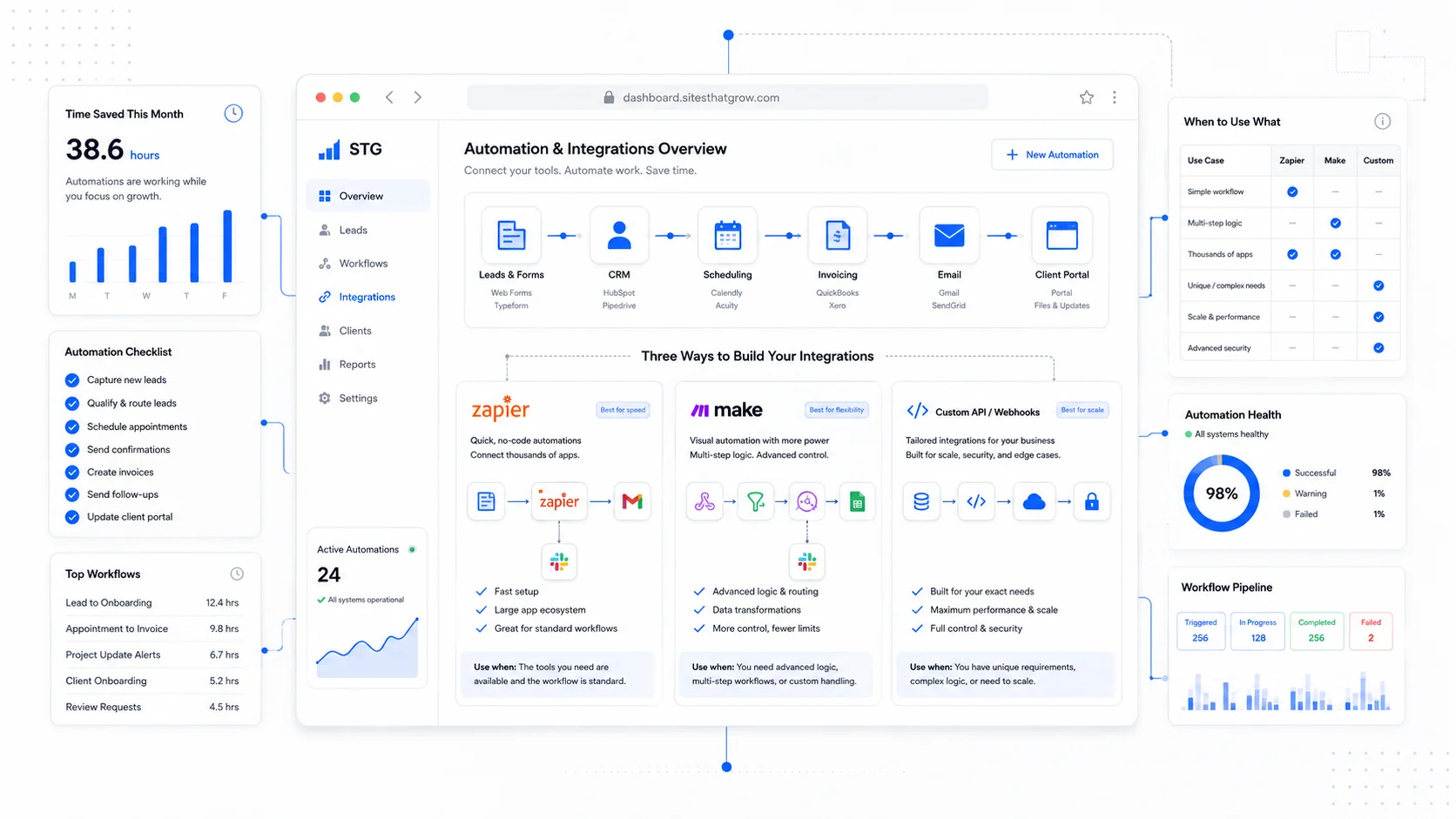
Most small businesses discover Zapier the same way: someone wires up a form-to-spreadsheet automation, the team is impressed, and within six months there are 47 zaps running, three of which are silently broken, and the monthly bill is higher than the salary you would pay an integration to do the same work in code. This is not a Zapier problem. It is a stage-of-growth problem.
No-code automation tools are excellent for the first 10 integrations a business needs. They become liabilities around integration 30, and they are almost always the wrong choice past 50. The trick is knowing where on that curve you are and switching deliberately rather than waiting for things to break.
This post covers the real limits of Zapier and Make, when API integration is genuinely cheaper, and what each option costs over a three-year horizon.
What No-Code Automation Is Actually Good At
Tools like Zapier, Make, n8n, and Workato all do the same fundamental thing: they listen for an event in one system, transform the data, and send it to another system. The differences are in pricing model, complexity ceiling, and whether you can self-host.
These tools are genuinely excellent when:
- The integration is one-way and stateless (form submission to CRM, calendar event to Slack notification).
- Volume is low (under a few thousand operations per month).
- You need it working today, not next quarter.
- The systems involved have native Zapier or Make connectors.
- The business logic is simple — "if this, then that, with one or two filters."
- The cost of a failed run is low (a missed Slack ping, not a missed payment).
For most small service businesses, this covers the boring 80 percent of internal automation: lead form to CRM, signed contract to Slack, paid invoice to Google Sheet, scheduled appointment to email reminder. None of this needs a developer, and trying to write custom code for it would be a waste.
The newer entrants — Make in particular — handle moderately complex flows with branching, error handling, and iteration that earlier Zapier could not match. Make's pricing on operations rather than tasks also tends to scale better for higher-volume workflows. n8n is worth a look if you want self-hosted automation with no per-task fees, especially for businesses uncomfortable with sensitive data passing through a SaaS vendor.
Where No-Code Quietly Falls Apart
The breakdown points are predictable.
Volume and cost. Zapier's pricing scales per task, and a "task" is each step. A flow with 6 steps that runs 10,000 times per month is 60,000 tasks. Past about 100,000 tasks per month, you are paying $400+ for what a single API call from your own server would handle for cents.
Stateful workflows. No-code tools struggle when the automation needs to remember things across runs. "If a customer signs a contract, then schedule a kickoff, then 3 days before the kickoff send a reminder, then if they cancel, refund the deposit and notify ops" — this is a workflow, not a chain of triggers. You can build it in Make, but the result is a fragile graph nobody wants to maintain.
Error handling. When a third-party API returns a 429 rate limit or a 503, what happens? In Zapier you get an email, the run sits in a queue, and someone has to remember to check. In code, you write a retry with exponential backoff and a dead-letter queue, and it heals itself. The AWS Architecture guidance on retry patterns is the canonical reference if you want to see how this is done seriously.
Vendor lock-in to the integration tool itself. Every workflow you build in Zapier is a Zapier-shaped artifact. If you move to Make, n8n, or custom, you rebuild from scratch.
Auditability and compliance. When a regulator or customer asks "what happened to my data on Tuesday at 3pm," a chain of zaps is hard to reconstruct. Custom code with structured logs and a tracing system like OpenTelemetry gives you a clean answer.
Latency. Zapier is not real-time. The default polling interval on free and starter plans is 15 minutes. If the workflow needs to fire within seconds — payment received, ship the digital good, notify the customer — you need webhooks hitting your own endpoint, not a polling automation.
Complex transforms. Anything beyond field mapping and string manipulation gets ugly. If you need to look up data from a third system mid-flow, conditionally branch on calculated values, or call an LLM to classify input, no-code tools become a maze.
When API Integration Is Cheaper Long-Term
The honest cost comparison requires honest numbers.
Assume a business with three serious integrations: lead form to CRM with enrichment, payment received to bookkeeping plus internal dashboard, and onboarding signed to project creation across three systems. Each runs roughly 5,000 times per month with 4–6 steps each.
In Zapier, this is roughly 90,000 tasks per month. The current Professional plan caps out around 50k tasks; you are on Team or Company plan at $300–$700+ per month. Plus the time to maintain the zaps when something breaks — call it 4 hours per month at a real cost of $200.
The same three integrations as direct API calls run on your own server for the cost of the server. On Vercel or Railway or a small AWS Lambda deployment, that is $20–$100 per month all in. The build cost is real — call it $8,000 to $20,000 depending on complexity — but it is one-time.
The crossover point is usually somewhere between month 12 and month 24. After that, custom integration costs less every month, and the gap widens.
The real win is not the line item. It is that custom integration becomes part of your software, where you can monitor it, log it, version it, and change it without paying per change.
The Hybrid Pattern That Usually Wins
For most small businesses, the smart play is hybrid: keep low-stakes, low-volume automations in Zapier or Make, and move high-stakes or high-volume flows into code.
The split that works for most service businesses:
Keep in no-code:
- Internal Slack notifications.
- New-lead alerts.
- Calendar event syncing.
- One-off marketing automations.
- Anything an ops person needs to change without involving a developer.
Move to code:
- Payment-related flows (use Stripe webhooks directly).
- Anything that creates customer-visible artifacts (emails, contracts, invoices).
- Multi-step workflows with state.
- Integrations that run more than 1,000 times per day.
- Anything where downtime costs real money.
This split keeps the team's flexibility on the boring stuff while making sure the load-bearing integrations are reliable and observable.
Real Examples Worth Mentioning
A few patterns we have shipped that illustrate the tradeoff.
Lead enrichment for a B2B services firm. Original setup: form submission triggers Zapier, which calls Clearbit for enrichment, then HubSpot for the contact create, then Slack for the team. Worked fine until volume hit 800 leads per day. Cost spiked to $400/month, and Clearbit calls failed silently when the API was slow. Moved to a custom Next.js API route that calls Clearbit's API directly, with retries and a dead-letter queue. Cost went to under $30/month and zero silent failures.
Subscription dunning for a SaaS-adjacent service. Stripe was already handling billing, but the team had wired Zapier to send a Slack message on every failed payment. With 3,000 active subscriptions and a 4 percent monthly failure rate, the channel became unusable. Replaced with a custom dashboard that surfaces failures with context (customer LTV, retry count, payment method type) and a one-click action to call the customer. Zapier got removed from the loop entirely.
Calendar sync for a multi-location service business. Moved appointments between an internal scheduling system and Google Calendar across 14 locations. Make handled it for a year, then started missing events when a single location's API token expired. Rebuilt as a custom integration using the Google Calendar API watch endpoints for push notifications instead of polling, with token refresh handled centrally. Zero missed events since.
The pattern is consistent: no-code worked until volume or stakes crossed a threshold, then custom paid for itself within months.
What to Look For in Your Own Setup
A short audit you can do this week:
- List every Zap or Make scenario currently running.
- For each, note: how often it runs, what happens if it fails, who notices.
- Flag any flow where the answer to "who notices" is "no one until a customer complains."
- Flag any flow that runs more than 1,000 times per month.
- For flagged flows, calculate the annual no-code cost (subscription portion + maintenance time).
- Compare to the one-time cost of building it directly. Anything that pays back in under 18 months is a candidate to move.
This audit is the same one we run for clients before recommending a custom software build. Sometimes it concludes that the no-code stack is fine. Sometimes it surfaces a $5,000-per-year automation tax the business did not realize it was paying.
A Note on Webhooks vs Polling
If you remember one technical thing from this post: prefer webhooks to polling.
A webhook is a system pushing data to you the moment something happens. Polling is your system asking "anything new?" every few minutes. Webhooks scale better, latency is near-zero, and they cost less. Most modern APIs — Stripe, GitHub, Shopify, Twilio — are webhook-first.
Zapier and Make can receive webhooks, but the value drops because the in-between vendor adds latency, a per-task cost, and another point of failure. If a system you depend on supports webhooks, the cleanest path is to receive them on your own endpoint and process them in code. The official Stripe webhooks documentation is a good reference for how to verify, replay, and idempotently process webhook events.
Action Items
- Audit your current Zapier or Make spend, including the team time spent maintaining flows. That is your real number.
- Identify the top three highest-volume or highest-stakes flows. Plan to move those to code first.
- For any flow involving payments, contracts, or customer communication, default to custom from day one.
- Use webhooks instead of polling wherever the source system supports them.
- Keep low-stakes ops automations in no-code. Do not over-engineer the stuff that does not move revenue.
Sites That Grow builds the integration layer that sits behind your website and apps. If your Zapier bill is creeping past $300 a month, that is usually the signal it is time to talk. Reach out and we will give you a honest read on what to keep and what to move.
More posts from the blog.

From Contact Form to CRM: The Minimum Lead Pipeline Every Service Business Should Automate
A practical lead pipeline for service businesses: connect forms, calls, email, CRM records, reminders, follow-ups, and reporting so good leads stop disappearing.

The 2026 Website Content Refresh Playbook: Updating Old Pages Without Breaking SEO
A practical content refresh process for small business websites: how to update stale pages, preserve rankings, improve AI search visibility, and avoid SEO mistakes.

The AI Chat Widget Decision: When It Helps Leads and When It Hurts Trust
AI chat widgets can qualify leads and answer common questions, but they can also slow the site, invent answers, mishandle privacy, and damage trust. Here is how to decide.
Keep reading?
More field notes from building modern websites and software for real businesses.