
API-First Business: Why Your Systems Should Talk to Each Other
What data silos actually cost, REST vs webhooks vs events, picking integration platforms, master data management basics, and avoiding vendor lock-in.
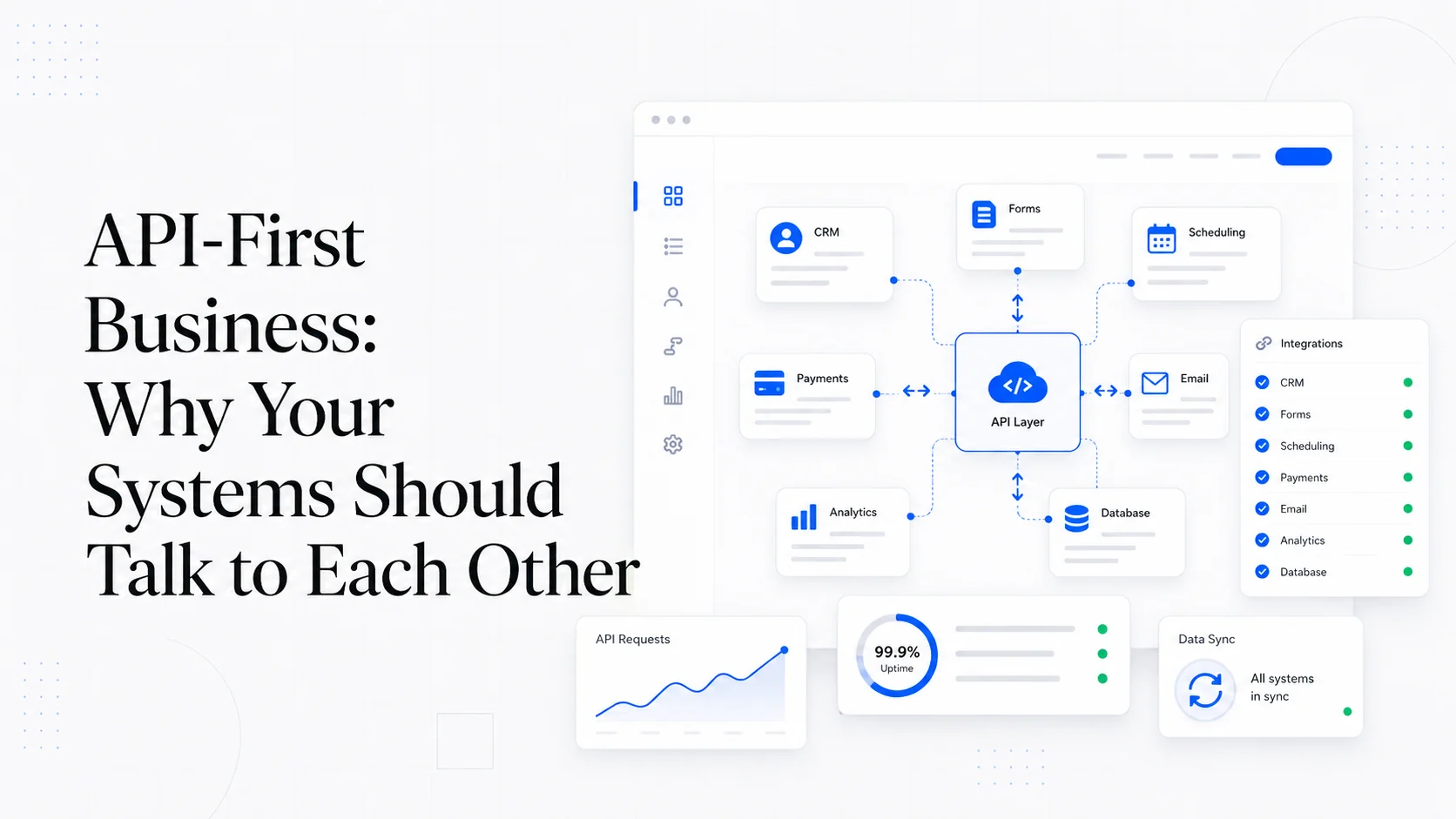
A small business with eight SaaS tools and no integration between them has eight versions of the truth. The customer's address in the CRM does not match the address in the billing system. The job status in the project tool does not match the status the client sees in the portal. The marketing team thinks there are 4,000 active customers; the finance team's report says 3,712. Nobody is lying. The systems just don't talk to each other.
This is the silent tax that kills small business productivity. The fix is not buying yet another tool. The fix is treating your business like an API-first system, where every important entity (customer, order, job, invoice) has one source of truth, and every other system reads or writes through a clean interface. This is how mid-market companies have operated for years. It is now affordable for small businesses too, thanks to better tooling and more open APIs.
This post is the practical case for an API-first approach: what data silos actually cost, how to wire systems together cleanly, and how to avoid trading one set of problems for another.
What Data Silos Actually Cost
The cost of disconnected systems is rarely a single line item. It shows up in a dozen small places:
- Staff time spent reconciling reports that should agree.
- Customer-facing errors when one system has stale data (sending an invoice to an old address, calling about a closed ticket).
- Lost revenue when leads fall through the cracks between marketing and sales.
- Compliance risk when customer data exists in five places and a deletion request only updates four.
- Slower decision-making because nobody trusts any single number.
- Onboarding time for new staff who have to learn five different tools.
A 2023 Gartner report on data quality put the average annual cost of poor data quality at $12.9 million per organization for enterprise. Small businesses don't lose millions, but they lose proportionally — the cost per employee is roughly the same. For a 20-person business, the silent tax of disconnected systems is often $50,000–$100,000 per year in wasted time and lost opportunity.
The fix is not heroic effort. It is a deliberate decision to make systems talk to each other.
REST vs Webhooks vs Event Streams
There are three fundamental patterns for systems integration, and most business problems map cleanly to one of them.
REST (request-response). System A asks System B a question and gets an answer. The classic pattern, defined in RFC 9110 and used by every major SaaS API. Good for fetching data on demand. Bad for keeping two systems in sync because you have to poll.
Webhooks (push notifications). System B tells System A when something interesting happens. The standard for real-time integration. Stripe webhooks, GitHub webhooks, Shopify webhooks, and Twilio webhooks all follow this pattern. Good for low-latency, high-volume integrations. Requires a public HTTP endpoint and proper signature verification.
Event streams (publish-subscribe). System B emits a stream of events; any number of systems can subscribe. The standard for serious distributed systems, implemented by Apache Kafka, AWS EventBridge, and Google Pub/Sub. Overkill for most small businesses, but worth knowing about because it scales to volumes the other patterns can't.
Most small business integrations should default to webhooks where the source system supports them, REST polling where it doesn't, and event streams only when volume demands it. Polling is the worst of the three options — high latency, high cost, easy to break — but sometimes it is the only choice when the source system is older or limited.
Picking an Integration Platform
For most small businesses, the integration layer is some combination of:
- Native API calls in your own application code. The cleanest option for high-volume or business-critical flows. Use the official SDK from each vendor (Stripe, HubSpot, Twilio) where available.
- No-code automation tools like Zapier, Make, n8n, or Workato for low-volume, low-stakes integrations. We covered the tradeoffs in detail in website integrations that actually save time.
- iPaaS (Integration Platform as a Service) for businesses with serious integration complexity — MuleSoft, Boomi, or Tray.io at the high end. Usually overkill below $50M revenue.
- Embedded integration platforms like Merge, Nango, or Paragon for products that need to integrate with many third-party tools on behalf of their customers.
For most small businesses building their first integration layer, the right answer is a thin custom layer built on Next.js or whatever your application framework is, calling vendor APIs directly. The complexity rarely justifies a dedicated iPaaS.
Master Data Management Without the Enterprise Overhead
"Master data management" sounds like an enterprise IT term, but the underlying idea is simple: for each important entity in your business, decide which system is the source of truth. Then make every other system read from that source.
For a typical service business, the assignment usually looks like:
- Customer master: Your CRM (or your custom database). Address, contact details, account status.
- Product/service catalog: Your billing system or a dedicated product database.
- Order/invoice master: Stripe or your billing platform.
- Job/project master: Your project management or field service system.
- Marketing engagement data: Your marketing automation tool.
- Support tickets: Your help desk tool.
Once you have decided who owns what, the integration job is straightforward: each system either pushes updates to the master or subscribes to changes from the master. No two systems ever both claim ownership of the same field.
The hardest part is not technical. It is getting the business to agree on these assignments. Once that is done, the engineering is mostly mechanical.
A useful concept from MDM literature is the "golden record" — the canonical version of an entity that all other systems reconcile against. For a customer, the golden record might combine the CRM's contact details, the billing system's payment method, and the support system's communication history into one consolidated view. The DAMA Data Management Body of Knowledge is the heavyweight reference if you want to go deeper.
Webhook Reliability: The Production Concerns
Webhooks are the right pattern for most integrations, but they require attention to a few production details that small businesses often miss.
Signature verification. Every webhook from a major vendor includes a cryptographic signature. Verify it. Without verification, anyone can send fake events to your endpoint. The Stripe webhook verification docs are the model implementation.
Idempotency. Webhooks can be delivered more than once. Your handler must be idempotent — processing the same event twice should produce the same result as processing it once. The pattern: store the event ID on first processing, check it on subsequent receipts. The Stripe idempotency documentation covers the canonical pattern.
Fast acknowledgment. Most webhook providers expect a 2xx response within 30 seconds. If your handler does heavy work (database writes, third-party API calls), acknowledge first and process asynchronously. Background job systems like Inngest, BullMQ, or AWS SQS handle this cleanly.
Retry handling. When your endpoint is down, vendors retry. Make sure your monitoring catches dropped events. A dead-letter queue (DLQ) for events that failed all retries is essential.
Replay capability. When something goes wrong, you need to replay events. Store the raw webhook payload before processing so you can re-run handlers without re-receiving the events.
These are not optional. A webhook handler without these properties will silently corrupt data the first time something unusual happens.
Vendor Lock-In: The Real Risk
Every integration creates lock-in to some degree. The art is choosing where to accept lock-in deliberately.
Lock-in is acceptable when:
- The vendor is a category leader unlikely to disappear (Stripe for payments, AWS for infrastructure).
- The cost of switching is small (you can rewrite the integration in days).
- The vendor's API is well-documented and stable.
- You can export your data in a usable format.
Lock-in is dangerous when:
- The vendor is small and at risk of being acquired or shut down.
- Your business logic lives inside the vendor's platform (Zapier zaps, Salesforce custom code).
- You can't export data in a usable format.
- The vendor has signaled it is winding down the API or the product.
The pattern that minimizes lock-in: keep your business logic in your own code, use vendor APIs for the commodity parts (payments, email, SMS, storage), and own the data model. If Stripe disappeared tomorrow, you should be able to swap to Adyen or Braintree without rewriting your application — just the payment integration layer.
This is the same pattern open source has used for decades, and it is what the 12-factor app methodology calls "treating backing services as attached resources." Vendors come and go. Your data model and business logic should outlast any of them.
API Standards Worth Knowing
A few standards are worth knowing about because they show up across most modern APIs:
- OpenAPI (formerly Swagger) — the standard format for documenting REST APIs. Most major vendors publish OpenAPI specs you can use to generate client SDKs.
- JSON Schema — the standard for validating JSON data structures. Used heavily inside OpenAPI specs.
- OAuth 2.0 and OIDC — the standards for delegated authorization and authentication. Almost every major API uses one or both.
- GraphQL — an alternative to REST, used by GitHub, Shopify, and a growing list of others.
- JWT — the standard format for tokens passed between systems.
You don't need to be an expert in any of these. You do need to know they exist, because they show up in every serious API conversation.
Real Examples of API-First Wins
A few patterns we have shipped that illustrate the value.
A field service business had separate systems for scheduling, billing, and customer communication. Each system thought it owned the customer record. The fix: designate the CRM as the customer master, set up webhooks from the CRM into the other two systems, and add a one-time reconciliation job to clean up existing mismatches. Time saved on data cleanup: roughly 6 hours per week. Customer complaints about wrong addresses on invoices: dropped to near zero.
A subscription service was using Zapier to sync new Stripe customers into HubSpot, Mailchimp, and a custom dashboard. At 5,000 new customers per month, the Zapier bill was $400+ and three of every hundred customers ended up in only two of the three systems. Replaced with a single webhook endpoint that received the Stripe event and fanned out to all three systems with proper retry handling. Cost: $0 marginal. Sync failures: zero in the first six months.
A multi-location service business had each location running its own copy of QuickBooks. The owner had no consolidated view of the whole business. Built a custom dashboard that pulled data from all locations via the QuickBooks API into a Postgres warehouse, with daily refresh. The owner went from waiting 30 days for monthly reports to seeing real-time consolidated revenue. Decision speed on closing or restructuring locations went from quarterly to monthly.
The pattern across all three: the integration paid for itself within a quarter, and the business gained a capability it couldn't have achieved by buying more SaaS.
Action Items
- Map the entities in your business (customer, order, job, invoice, lead) and assign one system as the master for each. Write it down.
- Identify the top 3 integrations where data is currently stale or wrong. These are your highest-ROI fixes.
- For any integration involving payments, contracts, or customer-visible data, default to webhooks with signature verification, idempotency, and dead-letter queues.
- Audit your current vendor lock-in. For each critical integration, write down what would happen if the vendor disappeared. The answer should be "we'd rewrite this part" not "we'd be out of business."
- Use the official SDKs from major vendors (Stripe, HubSpot, Twilio). Don't write your own HTTP clients for things that already have battle-tested libraries.
- Build observability into every integration from day one. Structured logs, metrics on success/failure rates, and alerts on error spikes are not optional.
Sites That Grow builds custom software and integration layers for businesses that have outgrown disconnected SaaS tools. If your team is reconciling reports across systems instead of using them, let's talk about what to wire together first.
More posts from the blog.

From Contact Form to CRM: The Minimum Lead Pipeline Every Service Business Should Automate
A practical lead pipeline for service businesses: connect forms, calls, email, CRM records, reminders, follow-ups, and reporting so good leads stop disappearing.

The 2026 Website Content Refresh Playbook: Updating Old Pages Without Breaking SEO
A practical content refresh process for small business websites: how to update stale pages, preserve rankings, improve AI search visibility, and avoid SEO mistakes.

The AI Chat Widget Decision: When It Helps Leads and When It Hurts Trust
AI chat widgets can qualify leads and answer common questions, but they can also slow the site, invent answers, mishandle privacy, and damage trust. Here is how to decide.
Keep reading?
More field notes from building modern websites and software for real businesses.