
Is WordPress Multisite One Theme or Multiple? How Themes Actually Work in a Network
A clear answer to whether WordPress Multisite uses one theme or multiple, how the shared theme folder really works, when Multisite is the right call, and the best WordPress and non-WordPress alternatives.
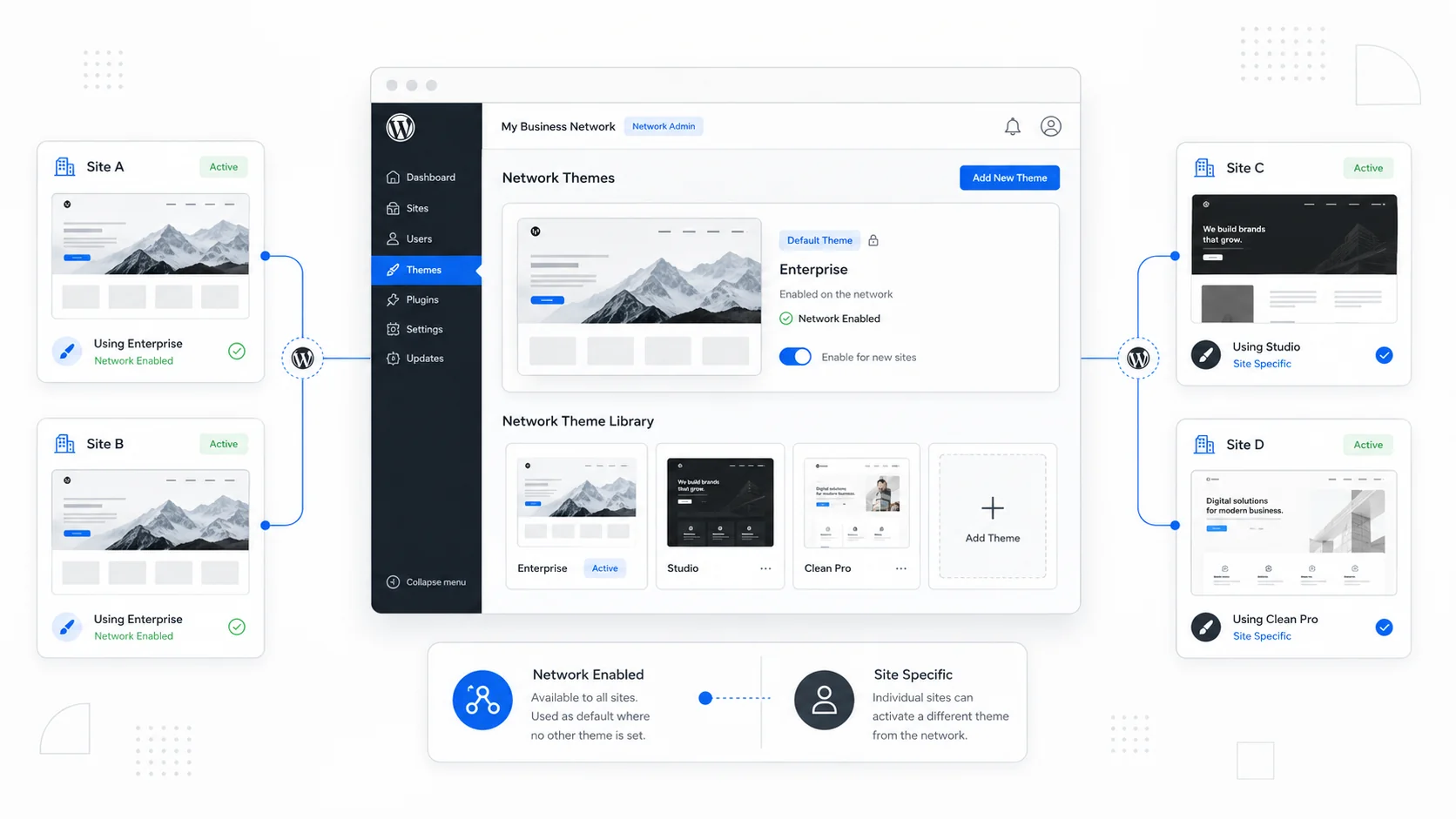
If you are looking at WordPress Multisite and wondering whether different sites in the network can run different themes — or whether everyone has to share one design — you are asking the right question. The answer changes when Multisite is genuinely useful versus when it quietly turns into a maintenance burden.
The short version, before we go further: WordPress Multisite uses one shared installation and one shared themes folder, but each site in the network activates its own theme independently from that pool. A Multisite network has many themes installed at the network level, and each subsite picks one of them to display. Different sites in the same network can absolutely run different themes.
That nuance is what trips most people up. The rest of this guide walks through what WordPress is, what Multisite is, the actual mechanics of theme management on a network, the scenarios where Multisite genuinely fits, and the alternatives — both inside and outside WordPress — that are worth considering before you commit.
We have built and managed hundreds of WordPress sites at Sites That Grow, including content-heavy directories like SeniorCenters.com and LocalCatholicChurches.com, and the most useful thing we can tell you up front is that "use Multisite" is rarely the answer it sounds like.
What WordPress Is
WordPress is the open-source content management system that powers a substantial share of the public internet. At its core it is a PHP application backed by a MySQL or MariaDB database, plus a folder structure that holds themes (which control how the site looks) and plugins (which add functionality). You install WordPress on a web host, point a domain at it, and you have a website with an admin dashboard, posts, pages, media management, and user accounts.
The reason WordPress became as common as it is comes down to three things: it is genuinely free, the theme and plugin ecosystems are enormous, and the dashboard is approachable enough that a non-developer can manage day-to-day content. That same accessibility is why "we use WordPress" is the default answer for most small business sites — even when it shouldn't be.
What WordPress Multisite Is
WordPress Multisite is a feature built into core WordPress that lets a single WordPress installation host multiple distinct sites, sometimes called a "network." The WordPress.org Advanced Administration handbook is the canonical reference, and Multisite has been part of WordPress core since version 3.0.
A Multisite network gives you:
- One WordPress codebase and one set of WordPress core files.
- One shared
wp-content/themesfolder for every theme used by any site in the network. - One shared
wp-content/pluginsfolder for plugins. - One database, but with a separate set of tables for each subsite (
wp_2_posts,wp_3_posts, and so on). - One Super Admin role at the network level, plus normal site admins on each subsite.
- Per-site users, content, settings, and active themes.
Each site in the network can live on its own subdomain (brand-a.example.com), its own subdirectory (example.com/brand-a), or its own mapped domain (brand-a.com). The familiar wp-admin for a subsite still works normally; the network adds a separate "Network Admin" dashboard that only Super Admins see.
WordPress.com itself — the hosted service — runs on top of Multisite at extreme scale. Every blog you have ever read on a wordpress.com URL is technically a subsite in a single, very large WordPress network.
So... One Theme or Multiple?
Here is the precise answer:
| Layer | Behaviour |
|---|---|
| Network installation | One — a single WordPress core install. |
| Themes folder | One — wp-content/themes is shared across all subsites. |
| Theme installation | Done once, at the network level, by a Super Admin. Site admins cannot install new themes. |
| Theme availability per site | Controlled per site — Super Admin chooses which themes a subsite is allowed to pick from. |
| Active theme on a subsite | One — each subsite has exactly one active theme at a time, just like a normal WordPress site. |
| Active themes across the network | Many — different subsites can each run a different theme. |
So when somebody asks "is WordPress Multisite one theme or multiple?", they are usually asking one of two things:
- "Can different sites use different designs?" Yes, freely. Subsites can run completely different themes.
- "Is there a separate themes folder per site?" No. There is only one themes folder for the whole network.
Most of the practical implications come from that second answer. Because all sites share the same physical theme files, editing a theme's CSS or PHP changes it for every subsite that has activated it. Per-site customization has to live somewhere else — usually in the WordPress Customizer, in widgets and menus stored in each subsite's database, or in a child theme.
The WordPress Multisite administration handbook covers the Super Admin's controls and the difference between "Network Activate" and per-site activation in detail. Worth reading once if you are setting one of these up.
How Multisite Themes Work in Practice
A few specifics that are easy to get wrong on the first try:
- Network Activate does not force a theme onto every site. It just makes that theme available to every subsite admin, who can then choose to activate it.
- A Super Admin can also network-enable a theme without activating it, which means "this theme is allowed to appear in the per-site theme picker."
- Site admins cannot install a new theme. They can only switch to themes that the network has already installed and enabled.
- A network can deactivate a theme without breaking sites that already have it active. The site keeps using it until someone switches.
- Customizer settings, widgets, menus, and most theme options are stored per site, not globally. Two sites running the same theme can look very different.
The cleanest mental model is this: the network supplies the menu of themes; each subsite picks one off the menu and styles it independently.
When WordPress Multisite Is the Right Call
Multisite is a good fit when you have many related sites under one team, on one host, sharing one plugin set. Six scenarios where it tends to earn its keep:
1. University and school networks
A typical university has hundreds of sub-sites — one per department, one per student club, one per course, sometimes one per faculty member. They share a brand framework, are administered by a small central IT team, and benefit from shared plugin updates and security patches. Multisite was practically designed for this case, and most large university networks run on it.
2. Multi-location franchises and branches
A regional chain — twelve clinics, twenty-four restaurant locations, fifty real-estate offices — usually wants a unified brand, the same plugins for booking and reviews, and a few distinct fields per location (address, hours, photos, local SEO). Multisite lets one corporate marketing team push consistent updates while each location manages its own content.
3. Magazine and publisher networks
Media companies often run several magazine brands under one roof. A Multisite network lets them share the same editorial plugins, ad management, and analytics tooling, while keeping each magazine's content, design, and audience cleanly separated.
4. Government and agency portals
A city or county website often consists of an umbrella site plus subsites for each department — police, fire, parks, public works. One IT team, many regulated sites, identical infrastructure requirements. Multisite is a strong fit when staffing is centralised and policies are consistent.
5. Internal company intranets
Larger companies run internal sites for HR, engineering, legal, and product comms. The audience is small, the auth model is shared, and the central IT team wants one place to handle plugin updates and backups. Multisite keeps the maintenance footprint small.
6. SaaS-style WordPress hosting
WordPress.com is the canonical example, but the same model is sometimes used by SaaS products that want to give customers a hosted WordPress site as part of the product — community sites, school portals, agency white-labels. Each customer is a subsite in the network.
When Multisite Is the Wrong Call
Multisite quietly becomes the wrong answer when:
- Sites have different ownership. If one site is sold, leaves, or needs to migrate, untangling it from the network is painful.
- Plugin needs diverge significantly. A legal practice site and a restaurant site shouldn't share a plugin set indefinitely. Updates to a network-activated plugin affect everyone.
- One site needs to scale independently. Once one subsite outgrows the others, the whole network has to move with it.
- Sites need very different security or compliance postures — HIPAA on one, plain marketing on another. Sharing a database tightens the blast radius of any incident.
- You want different hosts for different sites. Multisite locks the network to a single host.
In our experience, the most common reason small business owners ask about Multisite is that someone told them "you have ten sites, use Multisite." Almost always, the cleaner answer is ten separate WordPress installations centrally managed.
Multisite Alternatives Inside WordPress
If your real problem is "I have many WordPress sites and I want to manage them efficiently," not "I want them to share infrastructure," there are better tools than Multisite.
- ManageWP — A cloud dashboard that connects to any number of separate WordPress installs and centralises updates, backups, security checks, and uptime monitoring. Per-site, per-feature pricing.
- MainWP — A self-hosted alternative to ManageWP. You install one WordPress instance as the dashboard and a child plugin on each site you want to manage. Open source with optional paid extensions.
- InfiniteWP — A similar self-hosted dashboard with a free base and paid add-ons for advanced features.
- Bedrock by Roots — A modern WordPress boilerplate that reorganises the file structure, manages WordPress core, themes, and plugins via Composer, and makes it realistic to share a unified codebase across many independent WordPress installs. Common in agencies that ship dozens of similar client sites.
- WP-CLI — The official WordPress command-line interface. Lets a developer script updates, content imports, user management, and deployments across any number of installs from the terminal.
For most agencies running ten to fifty client sites, the right answer is some combination of separate installs, Bedrock or a similar boilerplate, and ManageWP or MainWP — not Multisite.
Multisite Alternatives Outside WordPress
If you are open to leaving the WordPress ecosystem entirely, several modern content systems handle multi-site or multi-tenant scenarios more elegantly than WordPress does — particularly for product-style projects where content needs to be queried like a database, not just rendered like a magazine.
Payload CMS
Payload is an open-source TypeScript and Node.js headless CMS, with a React admin panel and a strong developer experience. It has an official multi-tenant plugin that adds tenant fields to your collections so you can serve many tenants from a single Payload installation. It is self-hostable, with a managed Payload Cloud option as well. For agencies and product teams who want a modern stack with TypeScript, server actions, and a real database (Postgres or MongoDB), Payload is one of the strongest alternatives we recommend.
Drupal Multisite
Drupal has its own version of Multisite that works very similarly to WordPress: one shared codebase, multiple databases, one site per domain. The Drupal multisite documentation is the authoritative source. It's a common choice for government, higher-education, and enterprise teams that want centralised infrastructure without leaving the open-source PHP ecosystem.
Strapi
Strapi is a popular Node.js headless CMS. It does not have native Multisite — content is typically partitioned with a tenant field on each collection, or with the community strapi-plugin-multi-tenant plugin. The official guidance is one Strapi instance per project unless you have a strong reason to combine them.
Sanity
Sanity takes a different approach: a single project can hold multiple datasets (production, staging, per-locale), and you can run multiple separate projects when you need stricter isolation. For content-heavy products that want collaborative editing and schema-driven content, Sanity is a serious alternative.
Statamic
Statamic is a Laravel-based, flat-file CMS. It has built-in multi-site support for running multiple variants of one project — say, English and Spanish editions of the same brand, or several country-specific stores. It is explicitly not designed for fully independent multi-tenant setups; for that you'd run multiple Statamic installs.
Ghost
Ghost is a clean, focused publishing CMS — but it does not support Multisite. The official Ghost guidance is direct: each site needs its own install (and on Ghost(Pro), its own subscription). For one-brand newsletters and blogs, Ghost is excellent. For networks of sites, it's the wrong tool.
A short cross-CMS comparison:
| CMS | Multi-site approach | Stack | Best for |
|---|---|---|---|
| WordPress Multisite | Native, shared install with a network of subsites | PHP / MySQL | Many similar sites, one team |
| Drupal Multisite | Native, similar to WordPress Multisite | PHP / MySQL or Postgres | Public sector, education |
| Payload CMS (multi-tenant) | Tenant field added to collections | TypeScript / Node | Modern app-like multi-tenant products |
| Strapi | Manual partitioning or community plugin | TypeScript / Node | Developer-heavy headless setups |
| Sanity | Multi-dataset or multi-project | Hosted, structured content | Content-heavy publishers |
| Statamic | Native multi-site (Pro) | Laravel / flat files | Multi-language or multi-region of one brand |
| Ghost | Not supported | Node / MySQL | Single-brand newsletters and blogs |
How We Approach This for Clients
We have built and managed hundreds of WordPress sites at Sites That Grow, ranging from straightforward marketing sites to large directories with custom dashboards and ad management. A few patterns we see most often:
- A small business is told to use Multisite when what they actually need is one well-built WordPress site, or two or three independent ones managed via ManageWP.
- A franchise wants Multisite, and Multisite is genuinely the right call — but the network setup needs careful planning around plugin choices, theme inheritance, and SEO across subdomains or subdirectories.
- A directory or product business assumes WordPress is the right tool and discovers that a modern stack — Next.js, Payload, or a structured headless CMS — would have served them better. Our SeniorCenters.com and LocalCatholicChurches.com projects are good examples of where moving past the standard WordPress pattern unlocked real growth.
If you are weighing Multisite against alternatives, the practical questions to answer first are:
- How many sites is this, really, in 12 months? In 36?
- Are they owned by the same team forever, or might they spin out?
- Do they share a plugin set, or are their needs already diverging?
- Is there a single budget for hosting, security, and updates, or several?
- Is the content you are publishing really HTML-rendered pages, or is it more like a database that should be queried?
Those answers usually decide the architecture more than any feature comparison.
The Practical Takeaway
WordPress Multisite is one installation with one shared themes folder, but each site in the network activates its own theme independently from that pool. So the network has many themes installed and many themes active across all subsites — but each individual subsite still uses exactly one theme at a time, the same as any normal WordPress install.
Multisite is genuinely useful when you have many related sites sharing one team, one budget, one host, and one plugin set. It is the wrong tool when the sites have different ownership, different needs, or different growth trajectories. And it is rarely the right starting point for product-style work where the content is more like data than pages — Payload, Sanity, or a headless setup tend to fit those better.
If you are building a new site or considering a network rebuild, it is almost always worth pausing to ask whether WordPress is even the right starting point — or whether moving off WordPress to a more modern stack would serve the long-term goal better.
If you are stuck on this decision, it is the kind of thing we do all day. Our website design and development and website redesigns services start with that diagnostic question, and our hosting and migration work covers the messy parts — DNS, redirects, indexing — that decide whether the new architecture actually sticks.
More posts from the blog.

From Contact Form to CRM: The Minimum Lead Pipeline Every Service Business Should Automate
A practical lead pipeline for service businesses: connect forms, calls, email, CRM records, reminders, follow-ups, and reporting so good leads stop disappearing.

The 2026 Website Content Refresh Playbook: Updating Old Pages Without Breaking SEO
A practical content refresh process for small business websites: how to update stale pages, preserve rankings, improve AI search visibility, and avoid SEO mistakes.

The AI Chat Widget Decision: When It Helps Leads and When It Hurts Trust
AI chat widgets can qualify leads and answer common questions, but they can also slow the site, invent answers, mishandle privacy, and damage trust. Here is how to decide.
Keep reading?
More field notes from building modern websites and software for real businesses.