
When to Build Custom Software vs Buy Off-the-Shelf SaaS
A practical decision framework for small businesses choosing between building custom software and buying SaaS like Monday, Notion, Airtable, or Pipedrive.
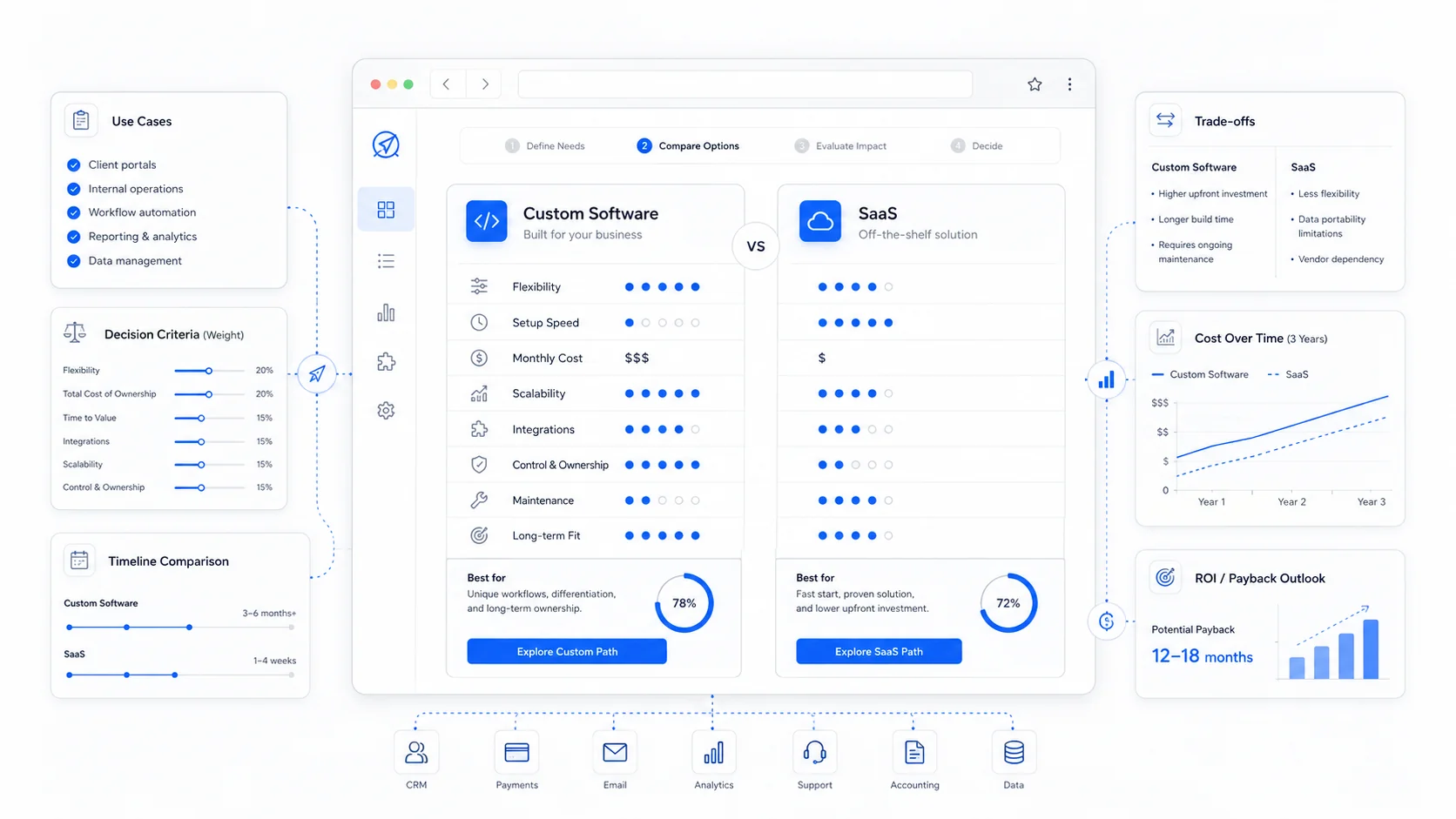
The build versus buy question is older than software itself, but it gets harder every year. There are more SaaS tools than any small business can evaluate, and at the same time, the cost of building custom software has dropped enough that "just build it" is a real option for problems that used to require a six-figure budget.
The honest answer is that most small businesses should buy first and build second. But "buy first" is not the same as "buy everything." There are specific situations where SaaS hurts more than it helps, and those are the situations where custom software pays back quickly.
This post is a framework for telling the difference.
Start By Asking What the Tool Is For
Before comparing options, name what the tool needs to do. Most build versus buy decisions go badly because the team skipped this step.
Useful questions:
- What problem does this tool solve today?
- Who uses it, and how often?
- What data does it own?
- What does it need to talk to?
- What happens if it disappears tomorrow?
- Is this a core part of how we make money, or a support function?
The last question matters most. Tools that touch revenue, client experience, or how work gets delivered are different from tools that handle accounting, internal chat, or HR.
For a calmer take on this, the Basecamp handbook is a good read on how a small team thinks about its tool stack.
When Off-the-Shelf SaaS Is the Right Answer
Buy when the problem is generic.
If a thousand other businesses have the same need, someone has already built a better version of the tool than you can build in a quarter. Email, accounting, payroll, calendars, video calls, password management, file storage, basic CRM, basic project management, e-signatures, and helpdesk software all fall here.
Buy when:
- The workflow is standard across your industry.
- You do not need to control the data model.
- Compliance, security, and uptime are non-negotiable.
- You need it next week, not next quarter.
- Your team will be smaller than 25 people for the next two years.
- The total cost over three years is lower than building.
A quick gut check: if you can describe the tool in one sentence and a SaaS product matches that sentence on its homepage, buy it. Tools like Pipedrive, Notion, Airtable, and Monday exist because they are good at the generic version of these jobs.
Custom software for a generic problem is almost always the wrong call. You will pay to rebuild features that already exist, and you will keep paying to maintain them.
When Custom Software Starts to Make Sense
Build when the problem is specific to how your business works, and SaaS forces you to bend your process to fit the tool.
Common signals:
- Staff spend hours every week copying data between three or four SaaS tools.
- You pay per-seat for software where most users only need one screen.
- Your spreadsheet has become the real source of truth, and the SaaS tool is just decoration.
- The thing that makes you different from competitors is hidden inside a generic tool that hides it.
- You have outgrown the SaaS pricing tier and the next tier costs more than a developer.
- You need a workflow that the SaaS tool cannot do, even with automation.
A good example is a service business that runs a billing model the SaaS does not understand. SeniorCenters needed a custom billing dashboard with advertiser management because the standard ad-network and invoicing platforms could not match how they sold and billed. Trying to bend an off-the-shelf product around that process would have cost more in workarounds than building the right thing.
Veterinary fertility storage is another one. There is no generic SaaS for tracking collections, dogs, customers, and PDF reports the way that industry actually works. The custom dashboard is the business operation, not a layer on top of it.
For a more strategic view on when custom investment pays back, Andreessen Horowitz and Sequoia Capital both publish useful posts on internal tooling and operational leverage.
The Real Cost of Each Option
The price tag on a SaaS subscription is rarely the full cost. The price tag on a custom build is rarely the full cost either.
For SaaS, also count:
- Per-seat fees as the team grows.
- Higher tiers to unlock features you assumed were included.
- Integration tools (Zapier, Make, n8n) to glue it to other systems.
- Staff time spent maintaining manual workarounds.
- Data export effort if you ever leave.
- The opportunity cost of not having the workflow you actually want.
For custom, also count:
- Discovery and planning time.
- Design and development.
- Hosting, monitoring, and backups.
- Bug fixes and small improvements after launch.
- Documentation and training.
- The risk of the project running long.
A simple rule we use with clients: if the three-year total cost of SaaS plus workarounds is in the same range as a custom build, lean custom. You get a tool shaped to your business, and you stop paying rent on someone else's roadmap.
Lock-In Is the Quiet Tax
Lock-in does not show up on an invoice, but it shapes every future decision.
SaaS lock-in shows up as:
- Data trapped in their schema, hard to export cleanly.
- Workflows tied to features that may be deprecated next year.
- Pricing changes you have no leverage against.
- Roadmap decisions that benefit other customers, not you.
- Integrations that break when one side updates an API.
Custom software has its own lock-in. You depend on the developer who built it, the framework it was built on, and the hosting it runs on. The difference is that custom lock-in is usually negotiable. You can switch developers, refactor the codebase, or migrate the database. SaaS lock-in is mostly take it or leave it.
If a tool holds data you cannot afford to lose or process you cannot afford to lose control of, custom is safer over a long horizon.
A Useful Middle Path: Build the Glue, Buy the Parts
Most small businesses should not build a CRM. But many would benefit from building a thin layer that ties their CRM, calendar, billing, and documents together into one workflow.
This is the pattern we use most often. The expensive parts (auth, payments, email delivery, file storage) come from proven SaaS or platforms like Supabase and Stripe. The custom layer is a client portal or internal dashboard that makes those parts feel like one product, shaped to your business.
You can see this pattern in SongCatcher Dachshunds, where a custom puppy CMS, Facebook auto-posting, and an owner community sit on top of standard infrastructure. None of those individual capabilities required reinventing the wheel. The value was in how they were combined.
A related guide on this approach is building a custom client portal for service businesses.
A Decision Checklist
When a client asks us whether to build or buy, we walk through these questions:
- Is this workflow generic or specific to how we work?
- How many people will use it, and at what tier of SaaS pricing?
- How many other tools does it need to talk to?
- How much manual data shuffling is happening today?
- Is there a SaaS that fits 80 percent of the need?
- If yes, can the remaining 20 percent be solved with automation and integrations?
- If no, what does a custom version look like at the smallest useful size?
- What is the three-year cost of each path, including hidden costs?
- What is the cost of being wrong, in either direction?
If five or more answers point toward custom, it is worth a real estimate. If they point toward SaaS, do not overthink it. Buy the tool, set it up well, and put your energy into the work that actually differentiates the business.
Final Takeaway
Buy when the problem is generic, the tool is mature, and the cost of switching later is acceptable. Build when the workflow is core to your business, the data is yours, and the SaaS option forces too many compromises.
Most small businesses get the best results from a mix: solid SaaS for standard functions, plus targeted custom software for the parts of the business that actually make them different. The goal is not to build everything, and not to buy everything. The goal is to spend money where it removes friction and earns it back.
Sites That Grow helps small businesses make this call honestly, then designs and builds the custom layer when it is the right move. If we think SaaS is the better answer, we will say so.
More posts from the blog.

From Contact Form to CRM: The Minimum Lead Pipeline Every Service Business Should Automate
A practical lead pipeline for service businesses: connect forms, calls, email, CRM records, reminders, follow-ups, and reporting so good leads stop disappearing.

The 2026 Website Content Refresh Playbook: Updating Old Pages Without Breaking SEO
A practical content refresh process for small business websites: how to update stale pages, preserve rankings, improve AI search visibility, and avoid SEO mistakes.

The AI Chat Widget Decision: When It Helps Leads and When It Hurts Trust
AI chat widgets can qualify leads and answer common questions, but they can also slow the site, invent answers, mishandle privacy, and damage trust. Here is how to decide.
Keep reading?
More field notes from building modern websites and software for real businesses.